
Introducing FitFlow: One App to Run Your Whole Training Business

You became a personal trainer to change people's lives, not to spend your evenings managing every aspect of your business. But when you're coaching 10 to 50 clients, you're running a business, too. And the day-to-day demands of running that business can quietly eat into the time you should be spending coaching: writing programs, answering messages, chasing payments, managing your schedule, and wondering which client might be about to leave.
FitFlow brings it all together. It's personal trainer software designed to take the juggling off your plate, so you can focus on what you do best. One app. Your whole business. More time for your clients.
Your programs, clients, payments, schedule, and chat finally live in one place. FitFlow helps you spot clients who may be losing momentum before it's too late to reach out. Its AI suggests weekly training adjustments, while you stay in control and approve every suggested change. You can even put your own brand on the client app.
And the pricing makes the value even clearer. With 50 clients, FitFlow Pro costs $59/month, compared with $135 for Trainerize and $164.98 for TrueCoach for the same client count, based on their respective base plans as of July 2026.
FitFlow is officially launching, with just 20 Founding Partner spots available at 50% off for life.
In this post, we'll cover why we built FitFlow, what you can do with it at launch, how much it costs, and where it still has room to improve. We're writing as trainers, for trainers, so you'll get the honest picture, including the trade-offs.
The trainer's week nobody budgets for
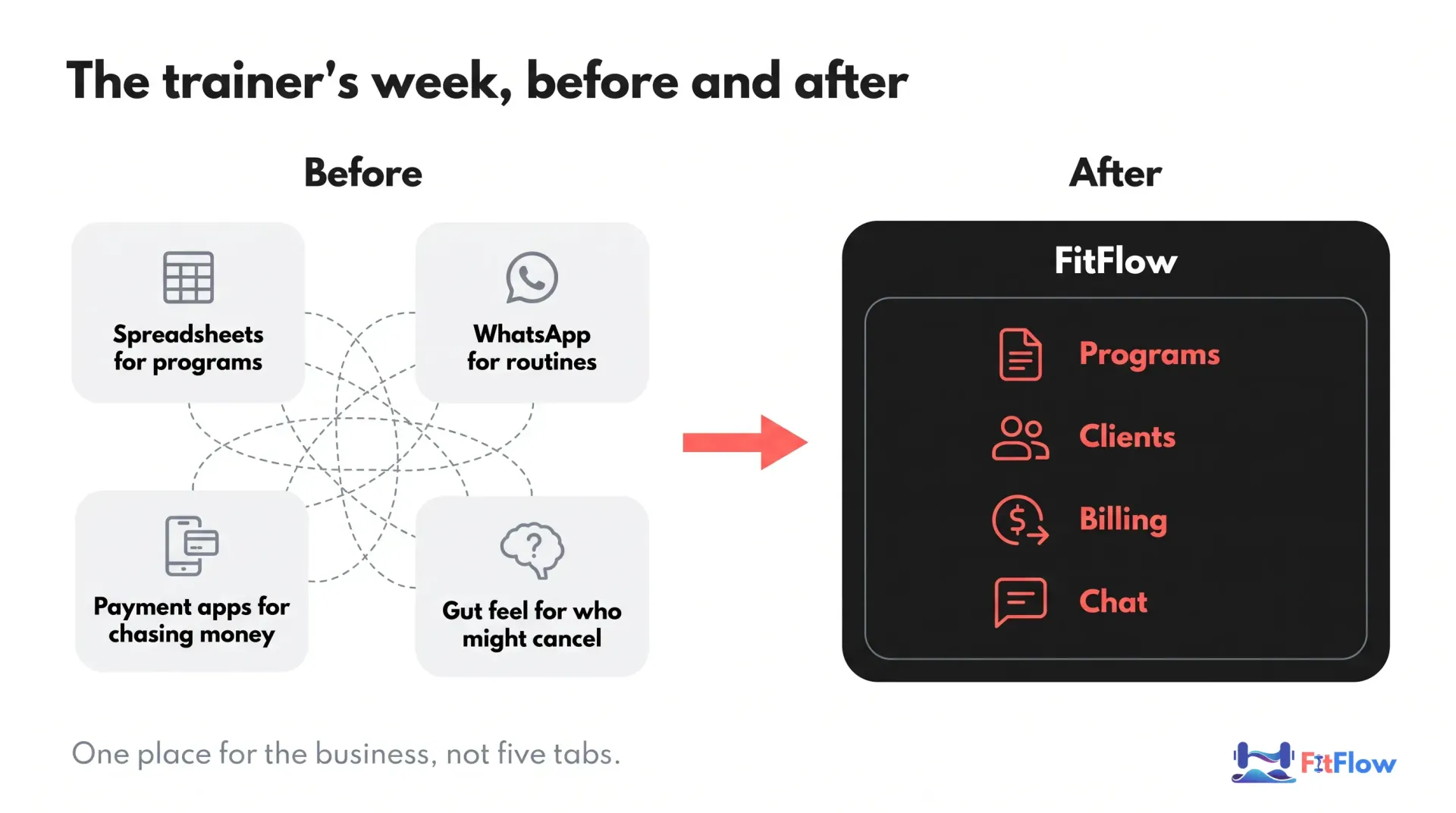
Here is a week most of us know. Programs are written in one place and sent from another, and a client's "can you resend last week's workout?" arrives at 9 p.m. Messages pile up across WhatsApp, text and email. Getting paid is a separate chore: you work out who hasn't paid and send a polite nudge you hoped you'd never have to send. Your bookings sit in one calendar and the plan behind them sits somewhere else.
Then there's the question no tool answers. Which of your clients is quietly drifting? You notice a missed session, then another, and by the time you're sure, they may already have decided.
None of that is coaching. It's the manual work around coaching, and it adds up to hours every week. That's time you'd rather spend on programming, on your clients, or on a day off.
That tension is why we're building FitFlow. Our aim is to give you those hours back. We won't claim a number we can't back up, and we'll tell you plainly what FitFlow does and doesn't do.
Related reading: the hidden cost of admin work
Notice what's missing from that picture: a villain. Whatever tools you use, most of them are fine. The problem is the gaps between them. Each time work moves from one tool to the next, something can get lost, a client gets a stale routine, or an invoice goes unsent. Holding it all together by hand is itself a part-time job, and you never agreed to it when you became a trainer.
Why we didn't stop at "all-in-one"
Let's be candid. Plenty of apps now bundle clients, programs and payments. "All-in-one" isn't special anymore, and if someone tells you it is, be skeptical. Most tools in this space already cover the basics, and you should expect them to.
So we built around three things we felt were missing.
First, you stay in charge of the AI. AI features are showing up everywhere. Trainerize's 2026 industry report says over 64% of trainers report actively using or exploring AI (a survey of its own coaches, sample size not stated). Interest is high. But interest isn't the same as trust. Our position is simple: the AI proposes, you approve. Nothing it suggests ever changes a client's program on its own.
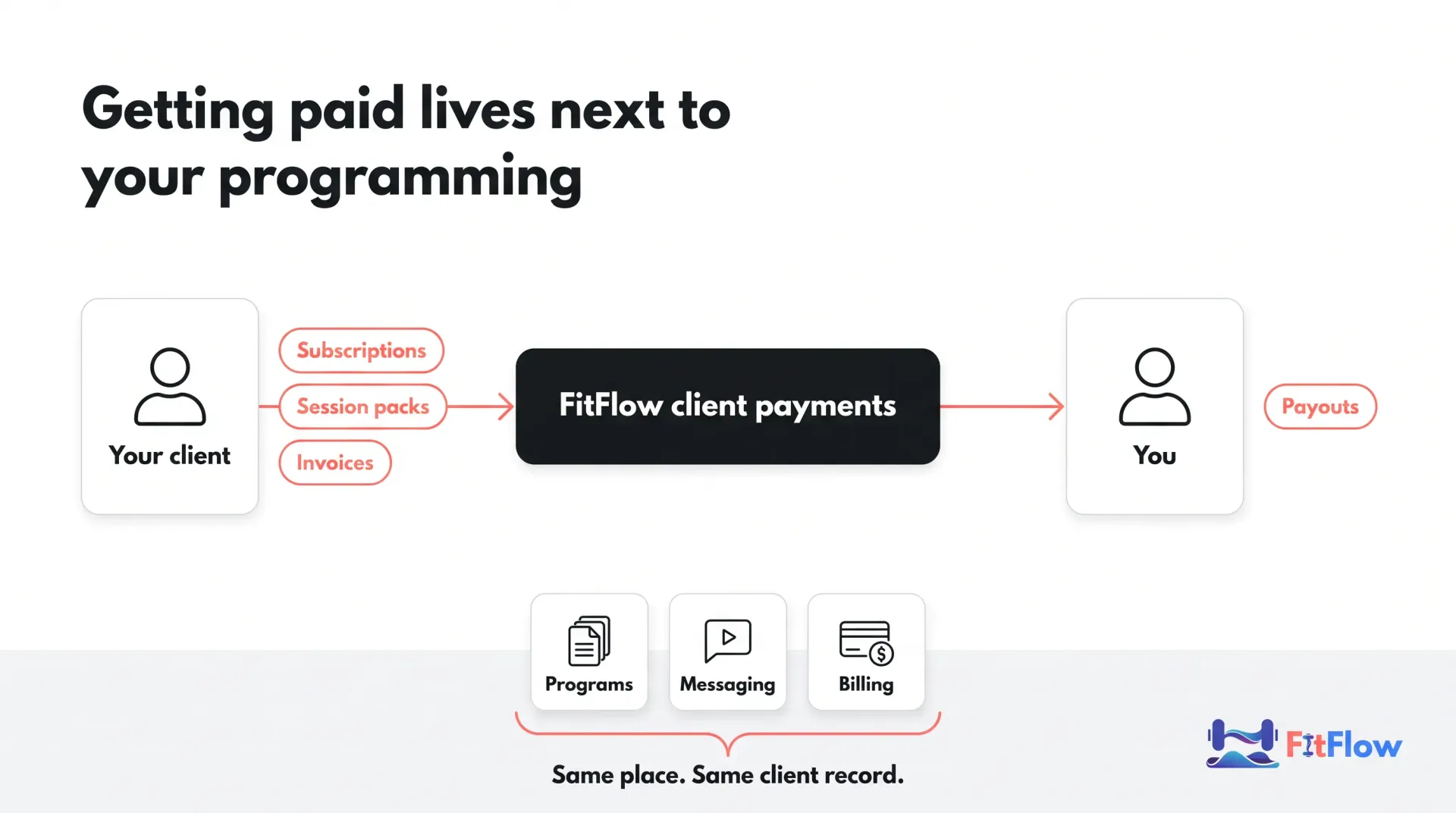
Second, payments and client retention sit next to the programs. Payments, alerts about clients who are drifting, and messages sit right next to the program you wrote, so you see the whole client at a glance instead of in five tabs.
Third, a price that stays sensible as you grow. Plans are priced by number of clients, and at 50 clients the gap to Trainerize and TrueCoach is large. The numbers are in the pricing section below.
Looking for a Trainerize alternative?
If you're comparing tools, that's smart. Most of us have outgrown a tool at some point, and switching is a real cost. FitFlow is our product, so weigh what follows accordingly. We won't tell you what other tools can't do, because we can't see inside them, and a feature missing from a homepage isn't a feature missing from the product.
What we can tell you is what FitFlow does differently: AI that waits for your approval, payments next to your programs, and alerts that tell you who needs a message from you this week. Read the rest of this post, check the pricing below, and judge for yourself. If another tool fits your business better, use it.
How we built it: the principles behind FitFlow
We can't give you a polished origin myth, and we won't invent one. What we can give you is the set of principles that every decision runs through.
AI augments the trainer; it never replaces them. You know your clients: the old shoulder injury, the stressful month at work, the session they keep almost skipping. An AI doesn't. So the AI suggests and you decide. There is no auto-apply anywhere in FitFlow.
One place for the business, not five tabs. Every extra tool is another login and another thing that gets out of date. We'd rather build one solution that does the job well.
Honest about trade-offs. Tools that promise everything usually deliver a demo. We'll say what takes effort and what isn't there yet, and we'll keep saying it.
Fitness should feel empowering, not intimidating. We call it anti-gymtimidation. The same goes for your clients' experience: if the app makes a beginner feel lost, it's failing the trainer who recommended it.
Nutrition stays inside scope of practice. We hold a line here. Nutrition prescription is a regulated area, and the rules differ by credential and by place. So FitFlow gives you meal plans reviewed by a dietitian to assign, not AI-written meal prescriptions for each client. We'd rather leave a gap than blur that line for you.
What FitFlow does at launch
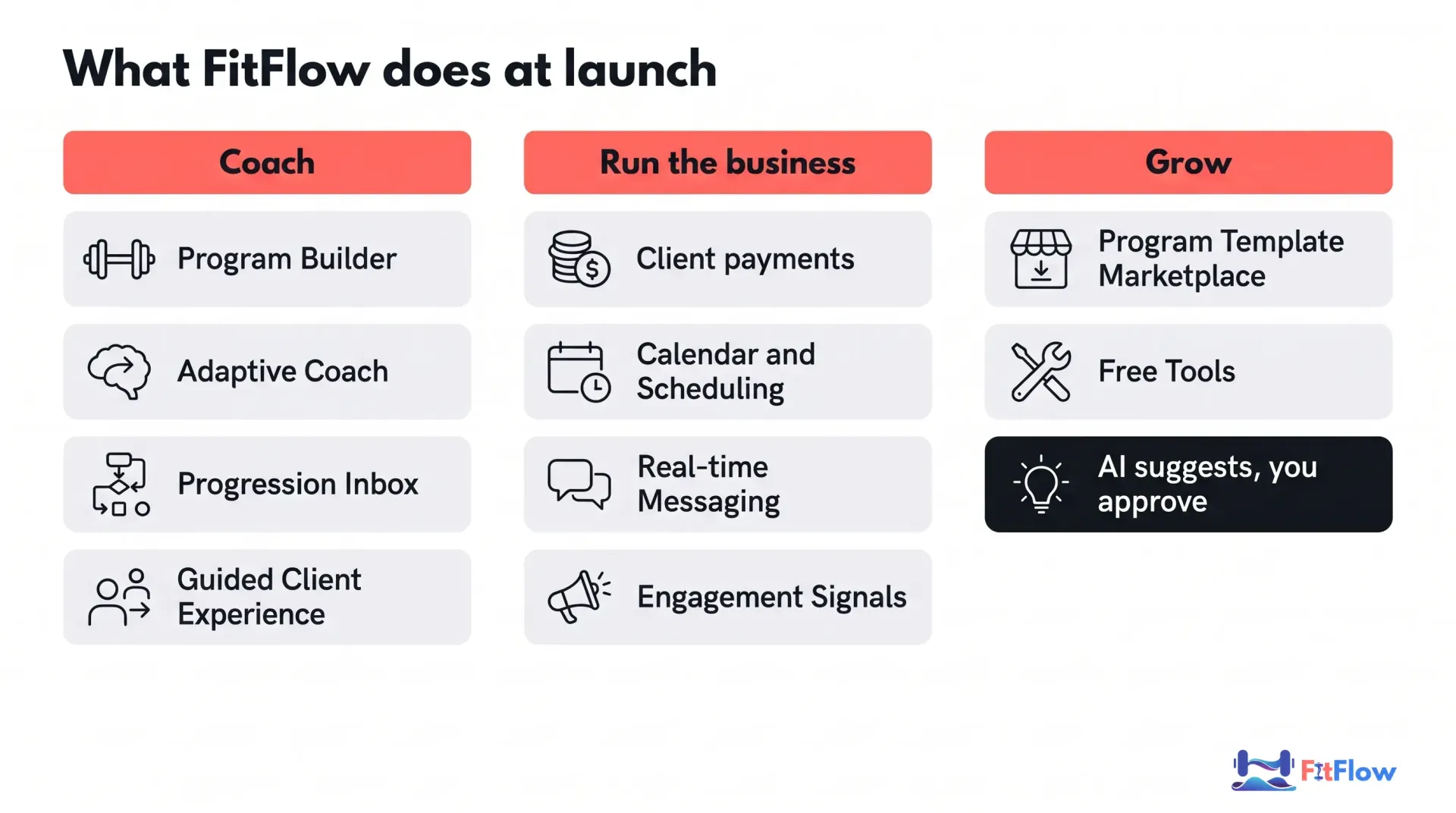
Here's the full tour, ordered by what we think matters most to a working trainer.
1. Program Builder
Build the programs you already write by dragging and dropping. You get reusable templates, a built-in exercise library and AI help for a quick first draft. Standard workouts are on every plan. Supersets, circuits, EMOM and AMRAP come with Pro, along with unlimited templates (Basic includes up to five of your own). Build once, assign to a client, adjust as they progress.
2. Adaptive Coach: AI suggestions, with you in charge
This is the feature we care most about, so it gets the most room.
Every week, Adaptive Coach reviews each client's training and suggests changes to each client's training load, along with a draft check-in message for you to read. Built-in checks catch suggestions that aren't backed by the client's data or fall outside safe limits.
Then it stops. In FitFlow, Adaptive Coach suggestions are never applied automatically. You approve, adjust or dismiss each one. The program changes only when you say so. Adaptive Coach is part of the Pro plan.
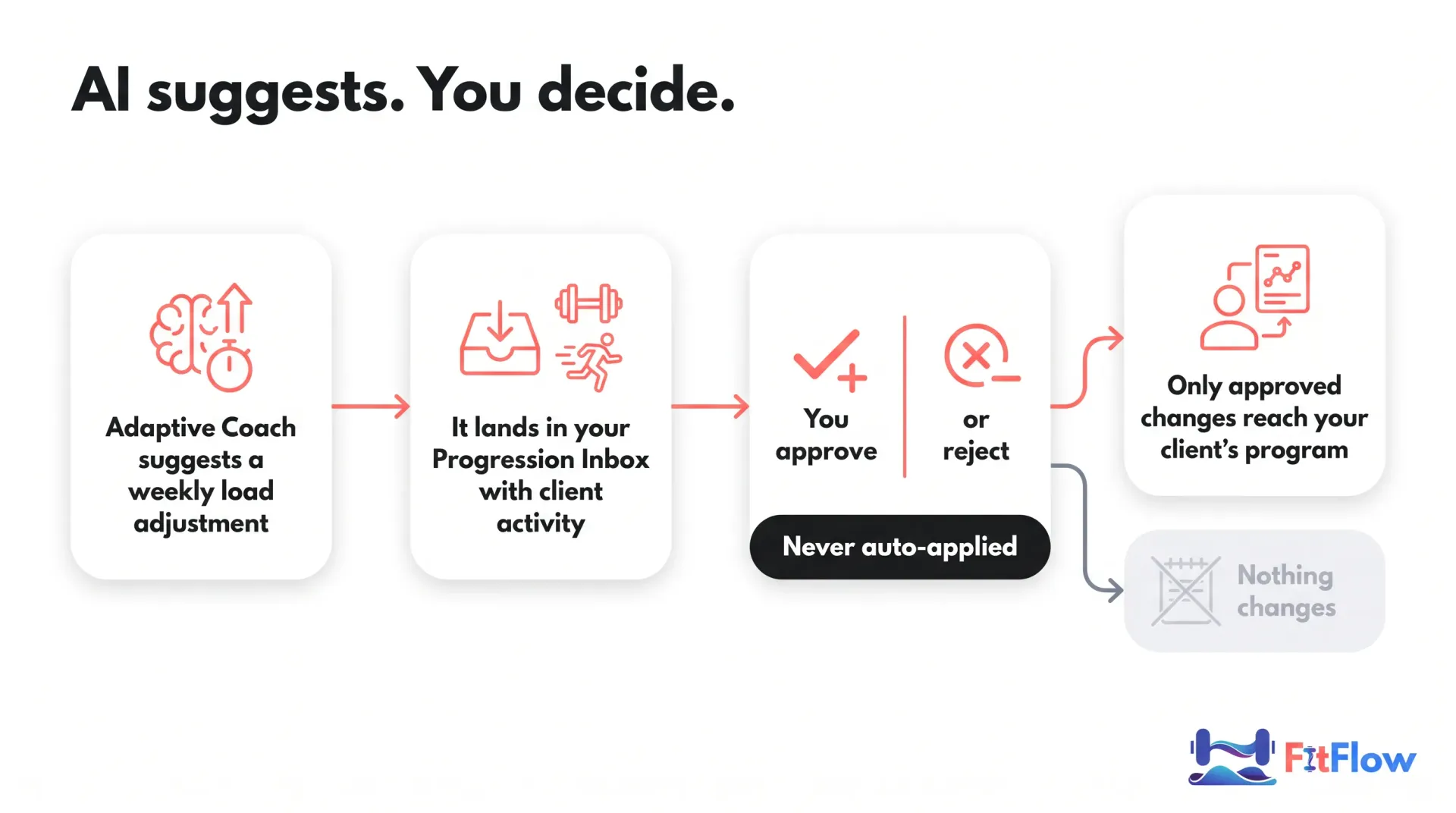
The real risk with AI in coaching is a bad suggestion nobody reviewed. An approval step costs you a little attention each week and keeps your judgment in the loop. We think that's a fair trade, and we'd rather say up front that it is one.
Related reading: AI coaching in personal training
3. Progression Inbox
One inbox, not a dozen notifications. The Progression Inbox gathers Adaptive Coach's suggestions and your clients' activity in one place, so you can go through them in one sitting. It's where you approve, adjust or dismiss, and move on.
4. Get paid without the chasing
FitFlow takes care of your client payments: subscriptions, session packs and invoices, plus a payment page you can share. Refunds, disputes and your earnings are all in one place, and the money is paid out to you. Because it sits next to each client's program and messages, you don't open a separate payment app, work out who is overdue, then switch back to see what that client has been doing. If you've been looking for a way to bill clients from the same place you build their programs, this is the part we built for that. Client payments are part of the Pro plan.
FitFlow charges a fee on client payments.
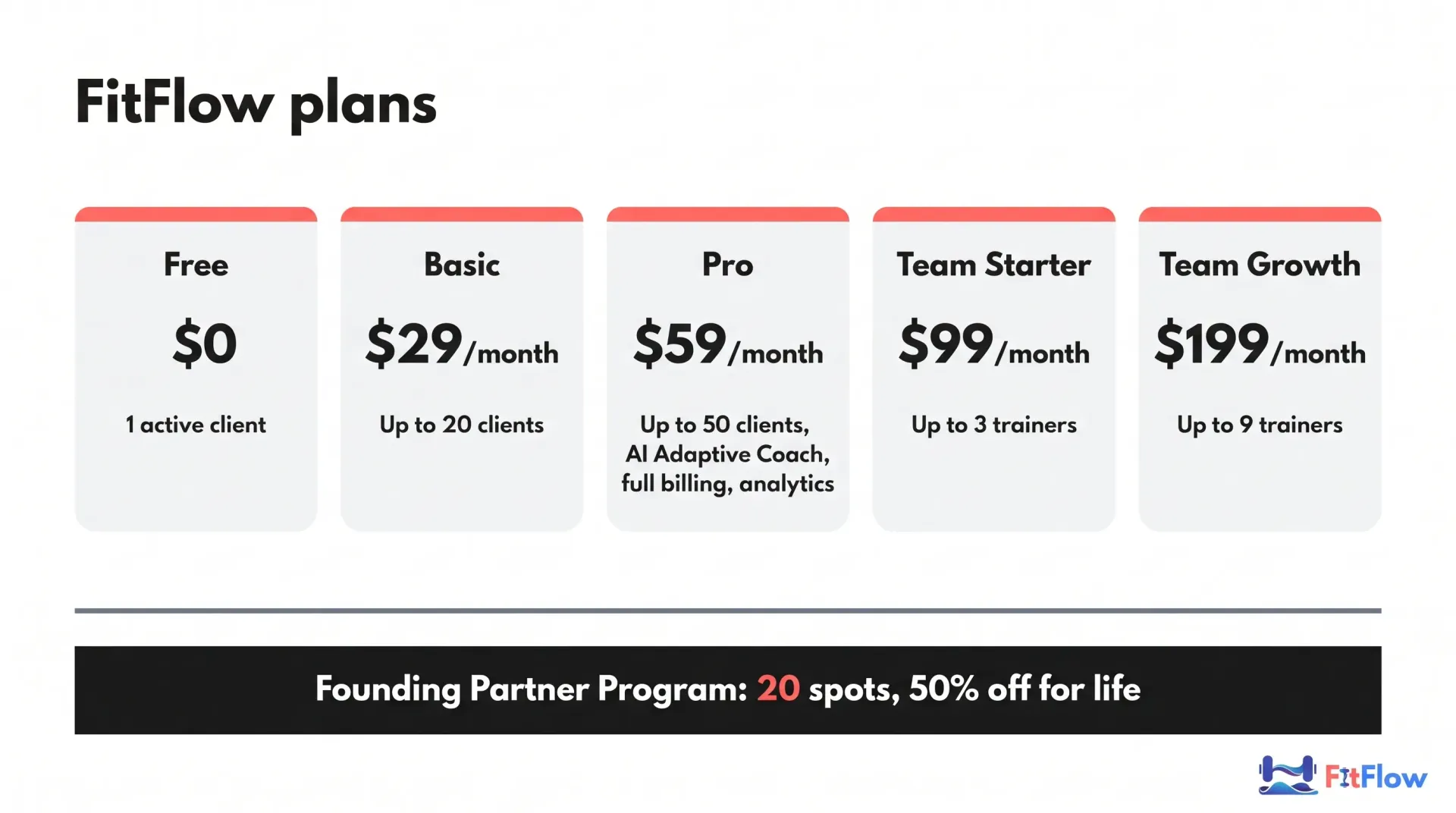
Founding Partner Program: 20 spots, 50% off for life. We're opening FitFlow to a first group of trainers who want to help shape the product. If you're ready to run your business on it, you can apply for a spot. Apply for a Founding Partner spot
5. Spot the clients who are about to leave
Clients often go quiet before they cancel. FitFlow marks each client as healthy, worth watching, or at risk, based on things like how long it's been since their last session and how consistently they finish their workouts. When someone looks at risk, you get an alert and a nudge to reach out, so you can step in while it still helps instead of finding out after they've gone. If you coach groups, you can also see how engaged the whole group is.
6. Scheduling
Set when you're available and let clients request sessions. You can add your FitFlow schedule to Google Calendar, Apple Calendar or Outlook, so your coaching and your day-to-day calendar sit side by side. Your sessions show up in your calendar, but changes you make there don't flow back to FitFlow yet.
7. Messaging and the client experience
Chat with your clients right next to the program you're talking about, with saved and scheduled messages so you don't type the same thing twice. Clients open a simple "today" screen and log their sets, weights and effort (RPE) as they train, even without a connection. They swipe to finish a set, and their personal records and habits are tracked alongside. It installs on their phone like an app. Messaging, the exercise library and your client overview are free on every plan.
8. Form checks and live coaching
Clients can attach a video to a set, and you check their technique and reply with feedback. During a session, live coaching shows you a client's sets as they log them, so you can send short cues while they train. It's a live view of their numbers, not a video call.
9. Nutrition, within your scope
Give a client a meal plan that a registered dietitian has reviewed, set their protein, carb and fat targets, and approve the weekly adjustments FitFlow suggests. Clients get a grocery list and a simple meal log. FitFlow doesn't write individual meal prescriptions with AI.
10. Your brand on the client app
Add your colors and logo, use a web address with your own name, and send emails under your brand, so clients see your business. Branding is available from the Basic plan.
11. Program Template Marketplace
Sell your programs to other coaches and, if you want, to the public through your own online store. Buyers can leave reviews, you can release updated versions, and refunds within 14 days are handled for you. You get paid through the same account as your client payments. FitFlow takes a commission on sales.
12. Teams and studios
Run a studio or coaching business with two to nine trainers. Team Starter gives you one dashboard for the whole business, and Team Growth adds reports across all your trainers. Splitting revenue between trainers isn't available yet.
13. Free tools
Free calculators for trainers, including a pricing calculator and an ROI calculator, to help you work out what to charge and what a tool is worth.
Who FitFlow is for (and who it isn't)
FitFlow is built for independent trainers with roughly 10 to 50 clients, and for online coaches who deliver programs remotely. If you're outside that range, check the plans below before you decide.
Pricing
Plan | Price | Who it's for |
|---|---|---|
Free | $0 (1 active client) | Trying it out on one real client |
Basic | $29/month | Up to 20 active clients, 5 custom templates, your own branding |
Pro | $59/month | Up to 50 active clients, unlimited templates, Adaptive Coach, client payments, advanced analytics |
Team Starter | $99/month | 2 to 3 trainers, one dashboard for your business, Pro features for each trainer |
Team Growth | $199/month | 4 to 9 trainers, adds reports across all your trainers |
Messaging, the exercise library and the client overview are free on every plan. Paid plans start with a 14-day trial, and paying yearly costs ten months for twelve, for example $590 a year for Pro.
How that compares at 50 clients
Most trainer apps price by number of clients, so the fair comparison is at the same number of clients. At 50 active clients, FitFlow Pro is $59/month. Trainerize lists $135/month for 50 clients and TrueCoach lists $164.98/month. These are base plans with add-ons and payment fees left out, read from each company's pricing page in July 2026, and they can change. Prices at other numbers of clients differ, so check the numbers for your own client list before you decide.
A few practical points about fit. If you're a solo or newer trainer with a small client list, Basic covers up to 20 active clients. If you're an independent trainer with a growing client list, the Pro plan covers up to 50 and is where the AI Adaptive Coach, client payments and analytics come together. If you work with other trainers, the two team plans cover up to 3 and up to 9 trainers. If you're not sure yet, the Free plan lets you try the core experience with one active client before you spend anything, and you can judge the Program Builder and the client experience on real work.
The honest trade-offs
We said we'd be straight with you, so here is the list:
The AI needs your attention. Because suggestions are never applied automatically, someone has to review them. It takes some of your attention each week. That's the cost of staying in control, and we think it's worth paying.
The Free plan is capped at one active client. It's enough to try FitFlow on real work, not enough to run a business on.
Some things aren't there yet. Your FitFlow schedule can be added to your calendar, but changes made in your calendar don't flow back yet. Live coaching shows your client's sets and lets you send cues, but it isn't a video call. Splitting revenue between trainers on team plans isn't built. FitFlow installs on your phone from the web today.
If one of those is a dealbreaker, better you know now than after you've moved your clients.
Join the Founding Partner Program
FitFlow is officially launching, and we're opening it to a first group of Founding Partners. There are only 20 spots.
50% off for life, on whichever paid plan you choose. For example, Pro would be $29.50/month instead of $59.
For trainers who want to shape the product. The scarcity is genuine: we want a small group we can listen to properly.
Applications are open now. We'll close the program once the 20 spots are filled.
We'd rather have 20 trainers who use it and tell us what's wrong than a long list of sign-ups who drift away. No countdown timers and no manufactured urgency. If it's a fit, apply. If it isn't, that's fine too.
Apply for a Founding Partner spot
Not ready to switch yet? Start with the checklist
Moving your whole business to a new system is a big step, and you may want to tighten your systems first, with any tool. Fair enough.
Free download: The Personal Trainer's Scaling Checklist: From 10 to 50 Clients Without Burning Out. A working checklist covering systems, billing, onboarding, program delivery, retention and capacity. It doesn't require FitFlow. Get the checklist
Apply as a Founding Partner if you're ready to run your business on FitFlow. Take the checklist if you'd rather scale cleanly first, with whatever tools you use.
Related reading: how to scale a personal training business to 50 clients . If you're still sorting out your tools, the fitness tech stack guide is a good place to start.
Key Takeaways
FitFlow is one app for programs, clients, payments and messaging, and it is officially launching.
The AI proposes and you approve. Adaptive Coach suggestions are never applied automatically.
Payments sit next to your programming, and alerts flag clients who are drifting.
You can also review client form videos and put your own brand on the client app.
At 50 clients, Pro is $59/month, against $135 (Trainerize) and $164.98 (TrueCoach) as listed in July 2026.
Free covers one active client; Basic is $29/month; Pro is $59/month; team plans are $99 and $199/month.
The trade-offs are real: AI suggestions take a little attention each week, and the Free plan is capped at one active client.
There are 20 Founding Partner spots at 50% off for life. Apply for a Founding Partner spot.
Frequently Asked Questions
Comments