
How to Build Your Fitness Tech Stack from Scratch: The 2026 Guide for Personal Trainers
How to Build Your Fitness Tech Stack from Scratch: The 2026 Guide for Personal Trainers
Written by the FitFlow editorial team after interviewing trainers across four business stages and reviewing 23 fitness platforms. Last reviewed: March 14, 2026.
TL;DR — The 3 things you need to know:
Think in systems, not tools. The average trainer uses 6-8 disconnected apps. An integrated stack saves 8-12 hours of admin per week — and that time converts directly to revenue or sanity.
Buy for your stage, not your ambition. A solo trainer with 8 clients needs a $40/month setup. A scaling trainer with 40 clients needs $300-$500/month. Overspending early is as damaging as underspending late.
Integration beats features. A good tool that talks to your other tools beats a great tool that operates alone. Make integration your first filter, not your last.
Get the Free Tech Stack Decision Matrix (7 Worksheets) - Download Free Matrix
The Real Problem With Fitness Technology
You got into personal training to coach people, not to spend your evenings toggling between six different apps trying to reconcile payments, chase late invoices, and copy-paste workout programs into a scheduling tool that does not talk to your CRM.
Yet that is exactly where most trainers end up. The average personal trainer juggles tools across scheduling, programming, payments, communication, and marketing — each operating in its own silo. The result is not just frustration. It is lost revenue. Research from the ACSM and industry platform data consistently shows that trainers who adopt a fitness tech stack personal trainer approach — selecting, integrating, and optimizing interconnected tools — recover hours of admin time each week and serve significantly more clients without burning out.
The fitness app market reached an estimated $12.1 billion in 2025, growing at 13.4% per year according to Grand View Research. Feed.fm's 2026 Digital Fitness Ecosystem Report confirms that fitness platforms are merging from single-purpose apps into all-in-one systems. Nearly half of all personal trainers now use hybrid models as their primary way of working, according to Trainerize's 2026 State of Personal Training Industry Report.
The tools you pick — and how well they work together — are no longer optional. They are a competitive requirement.
This guide is the platform-agnostic buyer's resource that does not exist elsewhere. No vendor wrote it to recommend their own product. Instead, you will get decision frameworks organized by business stage and budget tier, comparison tables across seven tool categories, an integration compatibility matrix, a 10-point evaluation checklist, and an ROI framework so you can measure whether your tech investment is actually paying for itself.
Whether you are a solo trainer with 5 clients or a studio owner managing a team, this guide will help you build a fitness tech stack that scales with you — not one you outgrow in six months.
I should be upfront: I have spent weeks talking to trainers at every stage about what they actually use versus what they think they should use. The gap between those two things is where most of the wasted money lives. This guide is built to close that gap.
Why Your Tech Stack Matters More Than Any Single Tool
Most trainers evaluate technology one tool at a time. They ask: "What is the best scheduling app?" or "Which CRM should I use?" But building an effective personal trainer software stack requires a different question: "How do all my tools work together?"
The Integration Imperative
Feed.fm's 2026 Digital Fitness Ecosystem Report, which analyzed over 100 digital fitness platforms, found that fitness app categories are blurring. Platforms are adding features that used to live in separate apps. AI workout plans, wearable syncing, and recovery tracking are no longer add-ons — they are expected parts of a single platform.
For trainers, the impact is simple. Every tool that does not connect to your other tools creates manual work: typing the same data twice, missing follow-ups, and giving clients a messy experience. When your scheduling app does not talk to your payment system, you manually chase invoices. When your programming tool does not sync with your CRM, you lose track of who needs a check-in.
Revenue Impact: Hybrid Models and Technology
The Trainerize 2026 State of Personal Training Industry Report found that roughly 50% of personal trainers now use hybrid coaching as their primary model, compared to approximately 32% online-only and 14% in-person-only. Hybrid trainers — those who bundle live sessions with app-based programming, on-demand content, and digital check-ins — can serve more clients without proportionally increasing hours worked.
According to the U.S. Bureau of Labor Statistics, the median annual wage for fitness trainers and instructors was $46,180 as of May 2024 — that is the market-wide figure including part-time and gym-employed roles. Among full-time, dedicated personal trainers, Trainerize's 2026 data shows in-person-only practitioners typically earn $60,000-$80,000 per year. Hybrid trainers — those who layer digital delivery onto their in-person work — average closer to $108,000, according to NASM salary data, with top performers reaching $150,000 and beyond.
The gap is real, and it is not about working more hours. Hybrid trainers serve more clients per hour of admin work because their tech handles the scheduling, check-ins, and payment chasing that in-person-only trainers still do manually.
Time Savings: The Hidden ROI
Industry scheduling platforms report that trainers save 2-3 hours per week on booking alone by automating appointment management. When you extend automation across payments, client communication, and program delivery, the total admin time recovered can reach 8-12 hours per week. That is time you can spend coaching, creating content, or simply not working on a Sunday evening.
Here is something that surprised me during research: the trainers saving the most time were not the ones with the most sophisticated stacks. They were the ones who had actually configured the automation features they were already paying for. Most trainers use about 30-40% of what their tools can do. Before adding anything new, check whether you are getting full value from what you already have.
The Consolidation Trend
The market is clearly moving from point solutions to integrated platforms. Health and fitness apps pulled in $4.5 billion in 2025 — up 13% from the year before, per Sensor Tower. Most of that growth came from platforms that bundle multiple functions into one app. Fewer subscriptions for you, a smoother experience for your clients.
The takeaway: do not optimize individual tools in isolation. Optimize how your tools work as a system.
The 7 Categories of Your Fitness Tech Stack
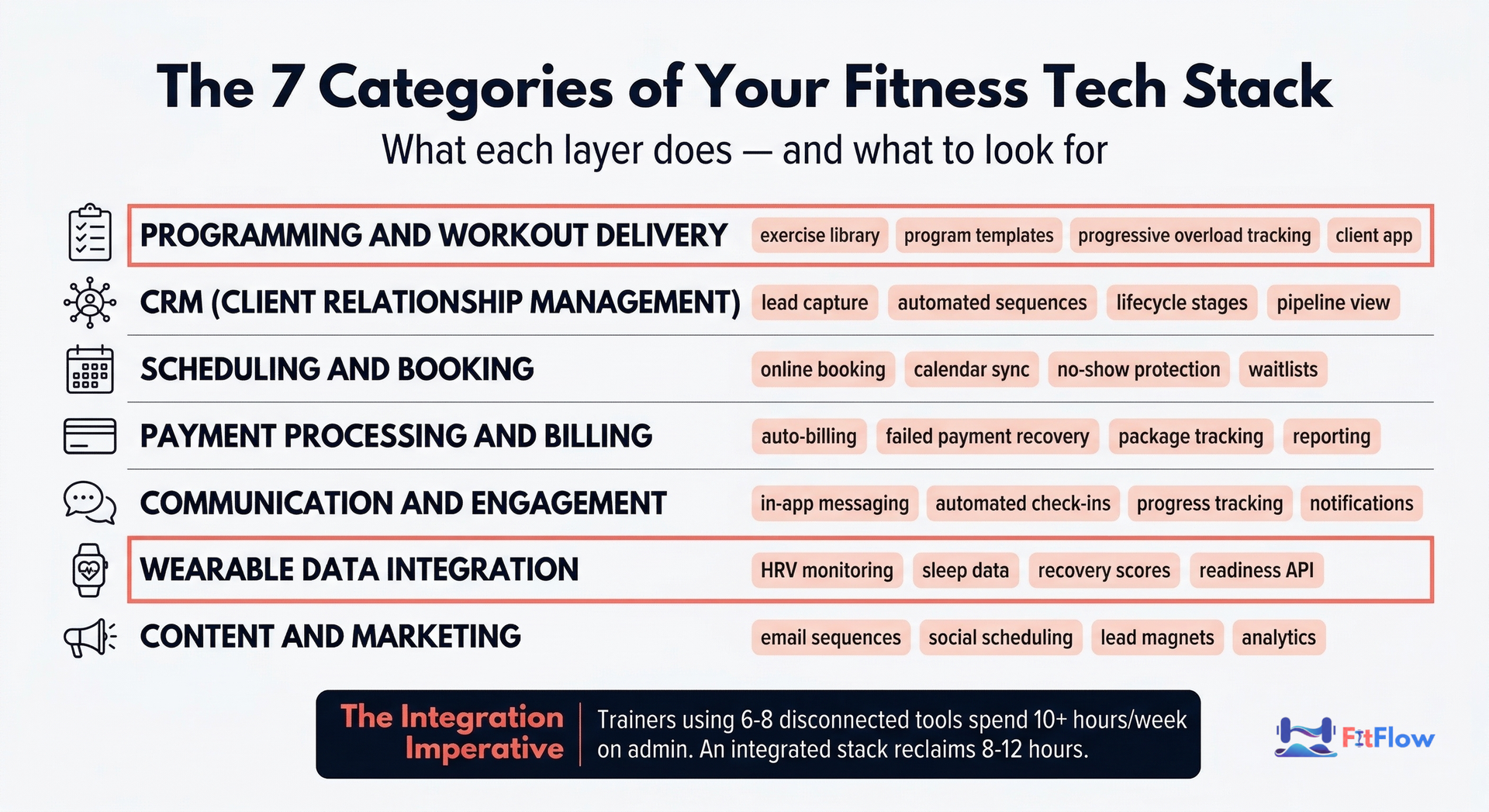
Every personal training business, regardless of size, needs tools across seven core categories. You may not need all seven on day one, but understanding the full landscape helps you make intentional choices instead of reactive ones.
1. Programming and Workout Delivery
What it does: Create, customize, deliver, and track training programs for individual clients or groups.
Key features to evaluate: Exercise video library, program templates, progressive overload tracking, client-facing mobile app, workout logging, and progress analytics.
Representative tools: Trainerize, TrueCoach, Everfit, My PT Hub, FitFlow (disclosure: our product), WeStrive, TrainerFu.
This is the operational core of your business. The programming tool your clients interact with daily shapes their perception of your professionalism. Prioritize a clean client experience and robust tracking over a massive exercise library you will never fully use.
2. Client Relationship Management (CRM)
What it does: Track leads, manage the client lifecycle from inquiry to renewal, and automate follow-up communication.
Key features to evaluate: Lead capture forms, automated email/SMS sequences, lifecycle stage tracking, communication logging, pipeline visibility.
Representative tools: FitFlow CRM (disclosure: our product), HoneyBook, Dubsado, GoHighLevel, Keap.
Many trainers skip CRM entirely and manage leads through text messages and sticky notes. This works at 5 clients. It breaks at 15. If you have ever searched for the best CRM for personal trainers, you already know the options range from free (HubSpot) to full-service (GoHighLevel). The right answer depends on your stage — but at any stage, a CRM ensures no lead falls through the cracks during your busiest weeks.
3. Scheduling and Booking
What it does: Allow clients to self-book sessions, sync with your calendar, and automate reminders to reduce no-shows.
Key features to evaluate: Online booking page, calendar sync (Google, Apple, Outlook), automated reminders via SMS/email, no-show protection (prepayment or late cancellation fees), waitlist management.
Representative tools: Calendly, Acuity Scheduling, Mindbody, Square Appointments, platform-native scheduling in tools like FitFlow (disclosure: our product) or Trainerize.
Scheduling tools have one of the fastest payback periods in your stack. If you are spending even 30 minutes per day coordinating sessions via text, that is 2.5+ hours per week — time a $15/month tool eliminates entirely.
4. Payment Processing and Billing
What it does: Handle invoicing, recurring payments, package management, and failed payment recovery.
Key features to evaluate: Auto-billing for recurring packages, failed payment retry logic, package and session tracking, invoicing, tax documentation and reporting.
Representative tools: Stripe, Square, PayPal, platform-integrated billing (most all-in-one fitness platforms include this).
The critical feature most trainers overlook: failed payment recovery. Stripe reports that its automated retry logic and dunning emails recover approximately 38-57% of payments that would otherwise be lost to expired cards or insufficient funds. If your billing tool does not handle this automatically, you are leaving money on the table every month.
5. Communication and Engagement
What it does: Enable client messaging, automated check-ins, progress photo tracking, and accountability between sessions.
Key features to evaluate: In-app messaging, automated check-in prompts, progress photo storage, group communication, notification management.
Representative tools: Platform-native messaging (Trainerize, TrueCoach, FitFlow), WhatsApp Business, Voxer, Slack.
The engagement category is where client retention is won or lost. Members who use a gym's branded fitness app are 50% more likely to renew their memberships compared to those who do not, according to Smart Health Clubs. The same principle applies to personal training: clients who interact with your platform between sessions stay longer.
6. Wearable Data Integration
What it does: Import and interpret client biometric data — heart rate variability (HRV), sleep quality, recovery scores, daily activity — to inform programming decisions.
Key features to evaluate: Device compatibility (Apple Watch, WHOOP, Garmin, Oura Ring), data visualization, readiness scores, automated alerts for recovery status.
Representative tools: Apple Health integration, WHOOP, Garmin Connect, Oura Ring API, platform-native integrations.
The ACSM's 2026 Worldwide Fitness Trends survey — based on responses from over 2,000 fitness professionals — ranked wearable technology as the number one trend, marking the eighth time in the last ten years it has held the top position. In 2024, more than 70% of wearable users reported applying their output data to exercise or recovery decisions. Over 30% of Americans now own a smartwatch, with fitness tracker adoption growing steadily across all age groups.
For trainers, the question is no longer whether to incorporate wearable data — it is how. The platforms that natively integrate with wearable ecosystems give you actionable data without requiring clients to screenshot their stats and send them via text.
7. Content and Marketing
What it does: Create client-facing content, manage email marketing, schedule social media posts, and generate leads.
Key features to evaluate: Email sequence automation, social media scheduling, landing page builders, lead magnet delivery, blog/SEO tools.
Representative tools: Mailchimp, ConvertKit, Buffer, Canva, platform-native content tools.
Most trainers invest in marketing tools too early or too late. Too early: you buy ConvertKit before you have 50 email subscribers. Too late: you have 200 followers asking about your services and no way to capture their contact information. Match your marketing tool investment to your current audience size and growth rate.
Tech Stack by Business Stage: What You Actually Need
The most common tech stack mistake is buying tools for the business you want instead of the business you have. A solo trainer with 8 clients does not need the same stack as a studio owner managing 150 members. Here is what to prioritize at each stage.
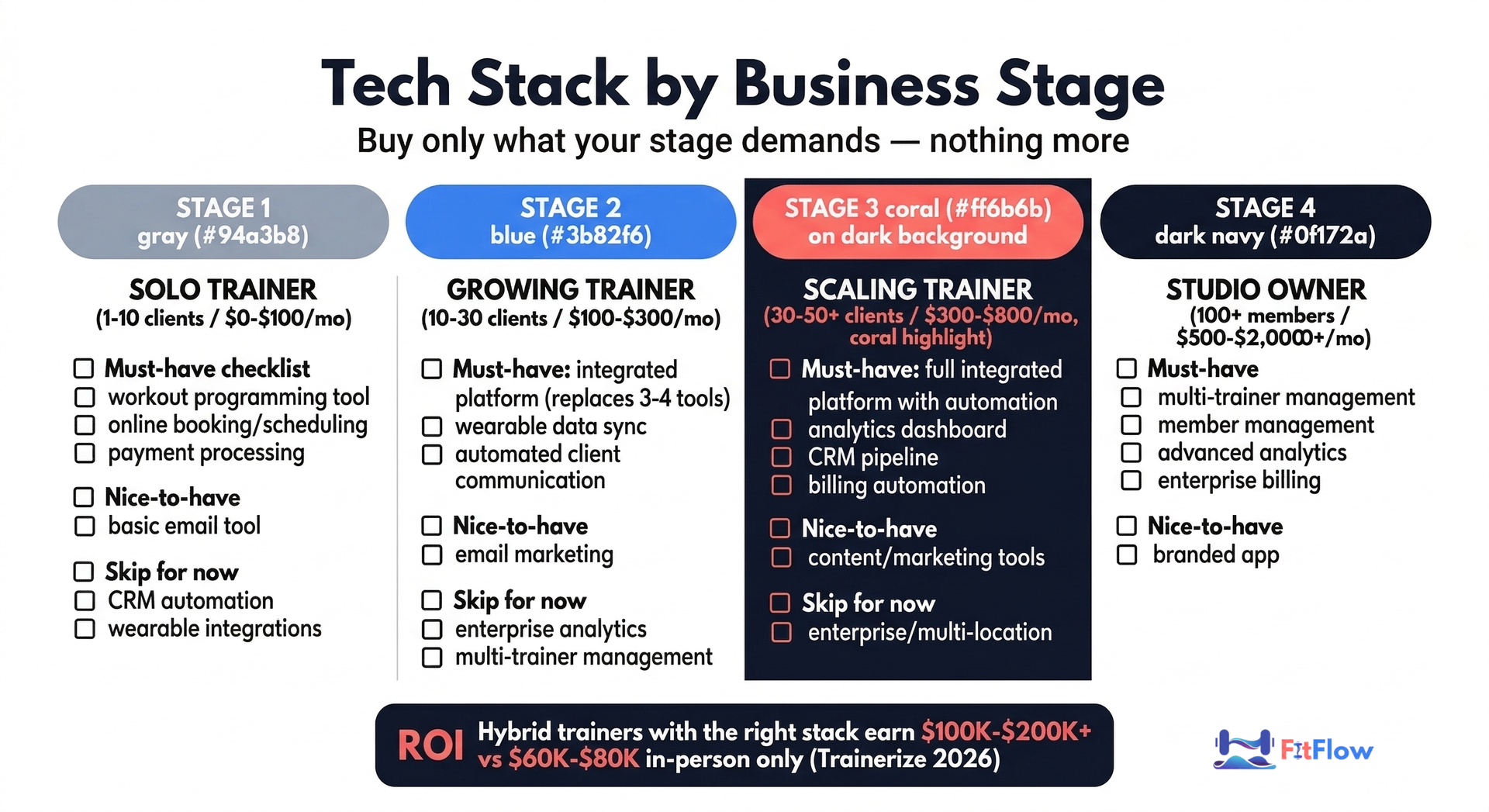
Stage 1: Solo Trainer (1-10 Clients) | Budget: $0-$100/month
At this stage, simplicity wins. Your priority is delivering great training and building a reputation, not optimizing fitness business automation tools you do not need yet.
Category | Recommended Tool | Monthly Cost | Why |
|---|---|---|---|
Programming | Trainerize (free tier) or Google Sheets | $0-$25 | Deliver workouts digitally, even if basic |
Scheduling | Calendly (free) or Acuity (starter) | $0-$16 | Stop texting about session times |
Payments | Stripe or Square | 2.9% + $0.30/txn | Reliable, professional invoicing |
Communication | WhatsApp Business | $0 | Where your clients already are |
CRM | Spreadsheet or free HubSpot CRM | $0 | Track leads, but do not overcomplicate |
Skip for now: Marketing automation, wearable integration platforms, advanced analytics. These are premature optimizations at this stage.
Total estimated cost: $0-$41/month plus payment processing fees.
Ready to Score Your Stack? Download the Decision Matrix. Download and Score Your Stack
Stage 2: Growing Trainer (10-30 Clients) | Budget: $100-$300/month
This is the stage where disconnected tools start breaking. You are spending too much time on admin and dropping balls on follow-ups. The move here is consolidation: replace 3-4 separate tools with an integrated platform.
Category | Recommended Tool | Monthly Cost | Why |
|---|---|---|---|
All-in-one platform | FitFlow, Trainerize, or My PT Hub | $50-$100 | Programming + CRM + scheduling in one system |
Payments | Platform-integrated or Stripe | $0-$30 + txn fees | Automated billing reduces chasing |
Communication | Platform-native messaging | Included | Keep conversations in one place |
Wearable integration | Apple Health / platform-native | $0-$20 | Start using client data for programming |
Marketing | Mailchimp (free) or ConvertKit | $0-$29 | Begin building your email list |
Key transition: This is where an integrated platform pays for itself. If one tool replaces your separate scheduling app ($16/mo), your standalone CRM ($25/mo), and your programming tool ($30/mo), the $70+ per month in separate subscriptions consolidates — often at a lower total cost with better functionality.
Total estimated cost: $100-$179/month plus payment processing fees.
Stage 3: Scaling Trainer / Small Team (30-50+ Clients) | Budget: $300-$800/month
At this stage, your bottleneck is not leads — it is operations. This is the stage where trainers start seriously asking how to automate personal training business workflows. You need automation at every touchpoint: onboarding sequences, automated check-ins, payment recovery, and data-driven programming adjustments.
Category | Recommended Tool | Monthly Cost | Why |
|---|---|---|---|
Full platform | FitFlow (Pro), Trainerize (Studio), or similar | $100-$250 | Automation, team features, analytics |
Advanced CRM | Platform-native or GoHighLevel | $0-$97 | Lead nurture sequences, pipeline management |
Payments | Platform-integrated with dunning | Included/txn fees | Automated failed payment recovery |
Wearable data | Deep integration (WHOOP, Garmin, Oura) | $0-$50 | Data-driven programming at scale |
Marketing | ConvertKit or Mailchimp (paid) | $29-$79 | Segmented email sequences, lead funnels |
Content | Canva (Pro) + Buffer | $25-$30 | Consistent content without hiring |
Total estimated cost: $300-$506/month plus payment processing fees.
Stage 4: Studio / Gym Owner (100+ Members) | Budget: $500-$2,000+/month
Enterprise needs: multi-trainer management, member experience platforms, retention analytics, and potentially multi-location support.
Category | Recommended Tool | Monthly Cost | Why |
|---|---|---|---|
Gym management | Mindbody, Wodify, or PushPress | $150-$500 | Member management at scale |
Programming (per trainer) | Platform-native or TrueCoach | $50-$200 | Each trainer needs programming tools |
CRM + Marketing | GoHighLevel or HubSpot | $97-$300 | Lead gen, automated nurture, reporting |
Payments | Platform-integrated | Included/txn fees | Multi-product billing |
Analytics | Platform-native + Google Analytics | $0-$100 | Retention, revenue, and engagement data |
Wearable/member app | Branded or white-label | $100-$500 | Member experience differentiation |
Total estimated cost: $500-$1,600/month plus payment processing fees.
The Integration Compatibility Matrix
If you have ever looked for a gym software integrations guide, you probably noticed that most articles list features but never explain which tools actually connect. Choosing excellent individual tools is only half the equation. If those tools do not communicate with each other, you are building a stack with gaps that you fill manually.
How Fitness Tools Connect
There are three levels of integration between fitness tools, and the differences matter more than most trainers realize:
Integration Type | What It Means | Data Flow | Setup Effort |
|---|---|---|---|
Native integration | Built-in connection between two platforms | Real-time, two-way | Minimal (toggle on) |
Zapier / Make (middleware) | Third-party connector bridges two tools | Near-real-time, usually one-directional | Moderate (configure triggers/actions) |
API-based (custom) | Developer builds a custom connection | Customizable | High (requires technical skills) |
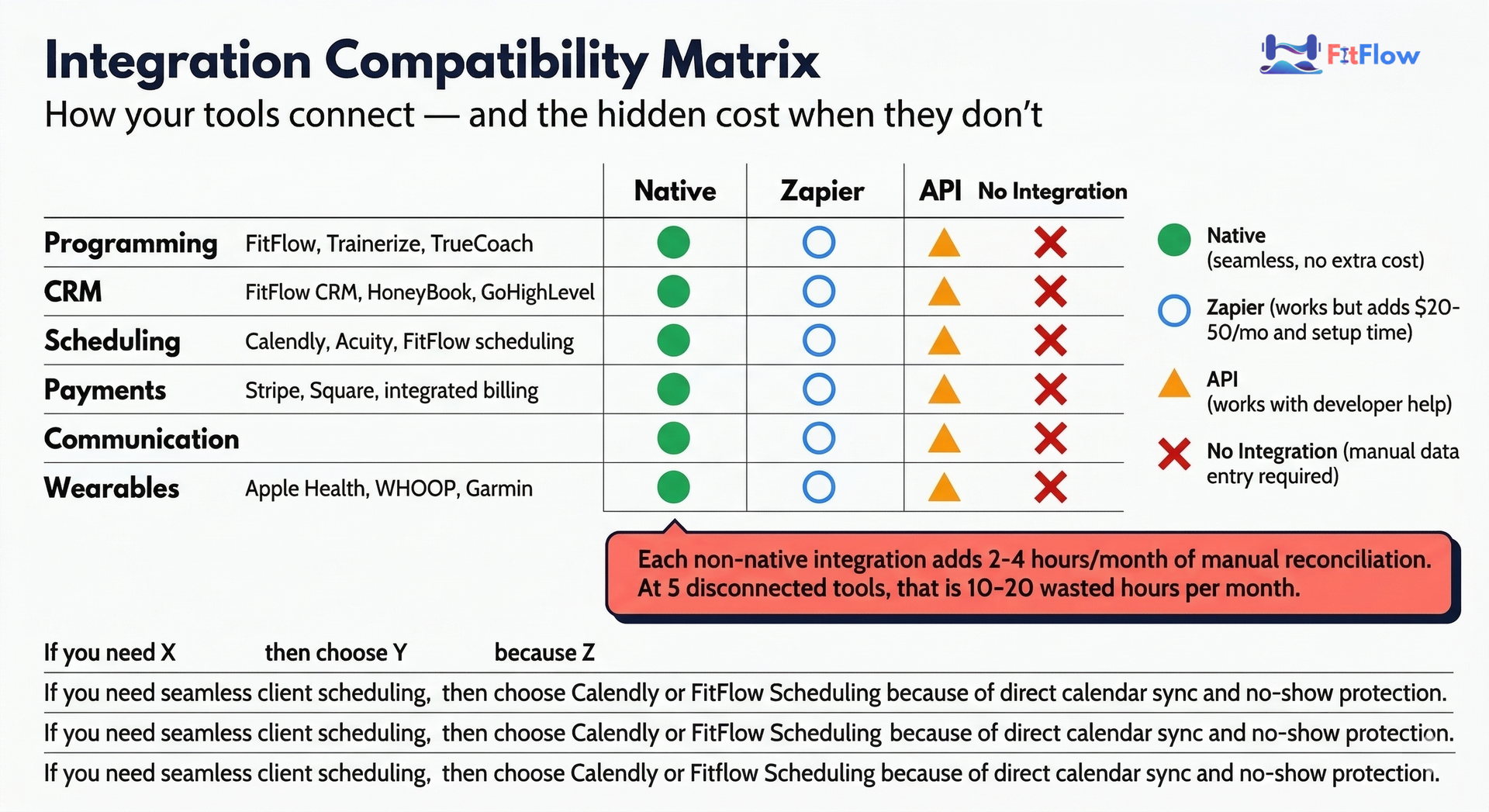
Integration Compatibility: Common Tool Pairings
Tool A | Tool B | Integration | Quality |
|---|---|---|---|
Stripe | Most platforms | Native | Excellent — standard payment rails |
Trainerize | Apple Health | Native | Good — activity and workout data |
Calendly | Google Calendar | Native | Excellent — two-way sync |
Calendly | Stripe | Native | Good — prepayment on booking |
My PT Hub | Zapier | Middleware | Moderate — limited triggers |
GoHighLevel | Stripe | Native | Good — payment + CRM pipeline |
WHOOP | Apple Health | Native | Good — HRV and recovery data |
Mailchimp | Most platforms | Native/Zapier | Good — email sync and tagging |
TrueCoach | Zapier | Middleware | Moderate — basic data flow |
The Hidden Cost of Non-Integration
Every manual step between two tools costs you time and introduces error risk. Consider a common workflow: a new client books a session.
Without integration: Client books on Calendly. You manually add them to your CRM. You manually create their profile in your programming tool. You manually send a welcome email. You manually create their invoice in Stripe. Five manual steps, each taking 3-5 minutes. At 4 new clients per month, that is 60-100 minutes of pure admin.
With integration: Client books on your platform. CRM record is created automatically. Onboarding email sequence triggers. Payment is processed. Programming profile is ready for you to customize. One manual step: building their program.
That difference adds up fast. One trainer I spoke with tracked it for a month — she was spending over four hours on tasks her platform could have automated. She just had not turned the features on. Do not be that person.
Decision Framework for Integration
When evaluating any new tool, ask these three questions in order:
Does it natively integrate with my primary platform? If yes, strong candidate.
Can I connect it via Zapier or Make? If yes, workable but monitor for reliability.
Does it require manual data transfer? If yes, calculate the time cost before committing.
The general rule: never add a tool that creates more manual work than it saves, regardless of how good its features look in a demo.
How to Evaluate Any Fitness Tool: The 10-Point Checklist
Before you add any tool to your stack — or replace one you are already using — run it through this evaluation framework. Score each criterion from 1 (poor) to 5 (excellent). Any tool scoring below 30/50 is likely not worth the switch.
Fair warning: I have watched trainers skip this step because a colleague recommended something on Instagram. Three months later, they are migrating again. Ten minutes with this checklist saves you forty hours of regret.
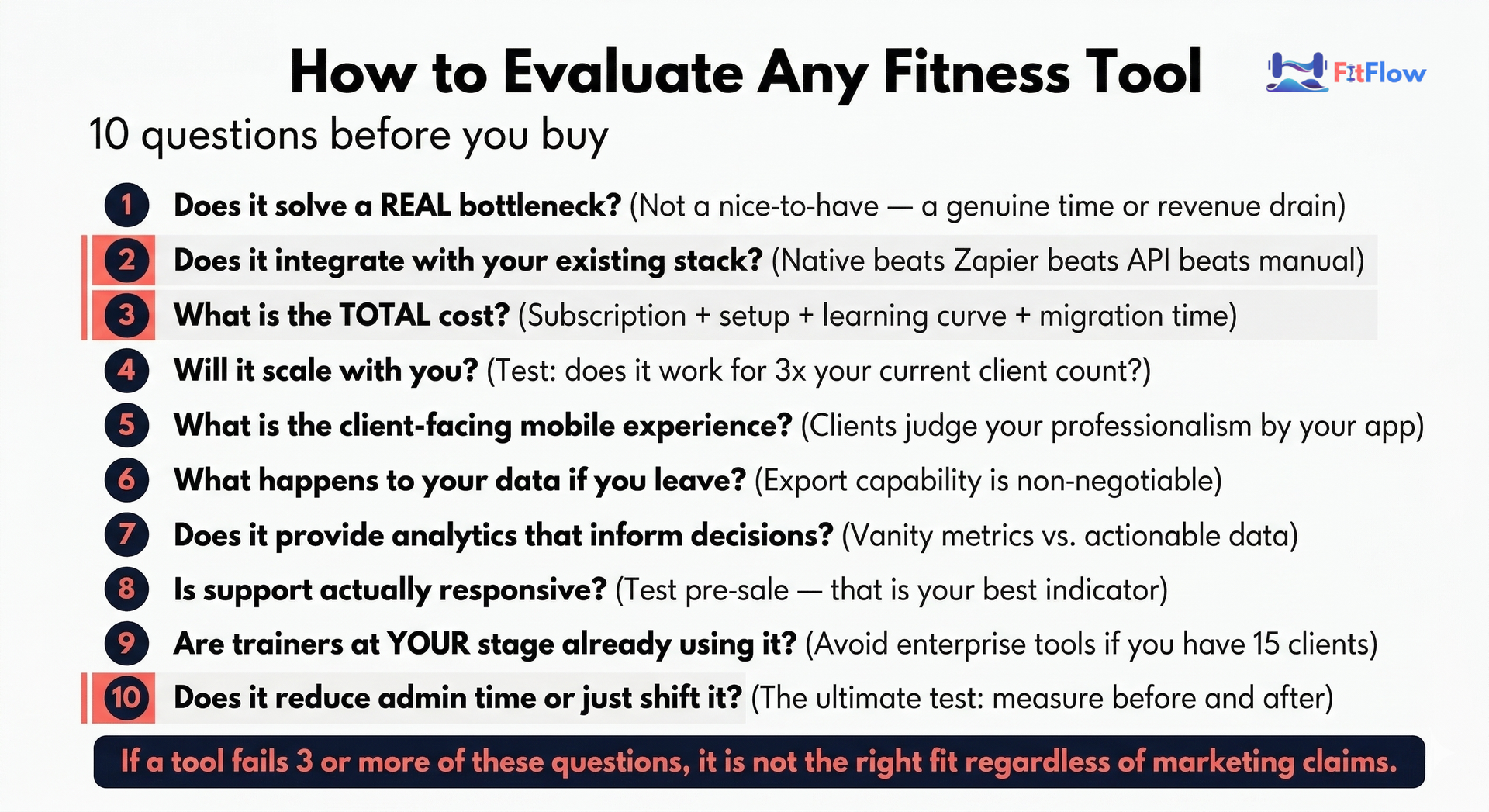
The Checklist
1. Does it solve a real bottleneck in your current workflow? Not a hypothetical problem. Not a "nice-to-have." Identify your single biggest time drain or revenue leak this month and ask whether this tool directly addresses it.
2. Does it integrate with your existing stack? Check the integrations page before the features page. A tool with 80% of the features you want and native integration beats a tool with 100% of the features that operates in a silo.
3. What is the total cost of adoption? Monthly fee is obvious. Hidden costs are not: setup time (hours to configure and migrate data), learning curve (weeks to proficiency), and opportunity cost (what you are not doing while you are setting this up).
4. Will it scale with you to your next business stage? If you are at 15 clients, does the tool still work at 40? Check pricing tiers, feature limits, and client caps. Migrating platforms is expensive — choose tools you will not outgrow in 12 months.
5. Does it have a mobile experience your clients will actually use? Open the client-facing app or interface on your phone. If it is clunky, slow, or confusing, your clients will stop using it — and you will lose the engagement benefits you are paying for.
6. What happens to your data if you leave? Can you export your client list, programming history, and payment records? Some platforms make it easy. Others hold your data hostage. Check the data export policy before you commit.
7. Does it provide analytics and reporting that inform real decisions? Dashboards that look impressive but do not answer questions like "which clients are at risk of churning?" or "what is my average revenue per client?" are decoration, not tools.
8. Is the support team responsive? Send a pre-purchase support question and time the response. If it takes 48 hours to answer a sales inquiry, imagine how long you will wait when something breaks on a Monday morning.
9. Do other trainers at your business stage use it successfully? Check reviews from trainers with a similar client count and delivery model. A tool that works well for a 200-member gym may be overkill for a solo hybrid trainer.
10. Does it reduce admin time or just shift it? Some tools automate one task but create three new ones: configuring workflows, managing notifications, and troubleshooting integrations. Net time savings is the metric that matters.
The ROI Framework: Is Your Tech Stack Paying for Itself?
Technology is an investment, not an expense — but only if you measure the return. Here is a simple framework any trainer can use to calculate whether their tech stack is delivering value.
The Time-to-Money Calculation
Start with the hours your tech stack saves you each week. Then multiply by what your time is worth:
Weekly hours saved x Your effective hourly rate = Weekly tech ROI
Example: If your integrated platform saves you 6 hours per week on scheduling, billing, and client communication, and your effective hourly rate (total monthly revenue / total hours worked) is $60/hour:
6 hours x $60 = $360/week in recovered time value
If your total tech stack costs $200/month, you are getting an 8:1 return on that investment.
The Client Capacity Multiplier
Technology does not just save time — it increases your capacity. Every hour recovered from admin is an hour you can spend coaching. If you use even half of your recovered time for additional sessions:
Additional sessions per week x Average session rate = Revenue lift
Example: 3 additional sessions per week at $75/session = $225/week or $900/month in additional revenue — from the same working hours.
The Retention Multiplier
Better client experience leads to longer tenure. Personal trainers significantly boost retention rates — members who work with trainers are 40% more likely to stay active, according to Smart Health Clubs data. Technology that keeps clients engaged between sessions (automated check-ins, progress tracking, wearable data feedback) amplifies this retention advantage.
A 10% improvement in average client tenure from 6 months to 6.6 months may not sound dramatic, but across 30 clients each paying $400/month, that is $72,000/year in additional lifetime value.
Results will vary based on your market, niche, pricing, and client demographics.
The ROI Benchmark
If your tech stack is not saving you at least 5 hours per week, something is wrong. Either you have the wrong tools, you have not configured them properly, or you are not using the automation features you are paying for.
Run this calculation quarterly. If the numbers do not justify the cost, it is time to audit, consolidate, or switch.
One trainer I interviewed — a hybrid coach with 28 clients — ran this exact exercise and found her tech stack was returning roughly $1,400/month in time savings and extra sessions, against $230/month in subscriptions. When I asked what changed the most, she said it was not any single tool. It was turning on the automated check-in feature she had been ignoring for six months. The ROI was hiding in a settings tab she never opened.
Common Tech Stack Mistakes (And How to Avoid Them)
After working with trainers at every business stage, these are the five patterns that consistently waste money and time.
1. Tool Hoarding
The pattern: Adding new tools without removing the ones they replace. You signed up for Trainerize, then tried TrueCoach, then heard about a new platform — and now you are paying for all three while only using one.
The fix: Audit your subscriptions quarterly. If you have not logged into a tool in 30 days, cancel it. Set a calendar reminder.
2. Shiny Object Syndrome
The pattern: Switching platforms every 6 months because a competitor launched a new feature or a colleague recommended something different. Every switch costs you 20-40 hours of setup, data migration, and relearning — plus client disruption.
The fix: Commit to your core platform for at least 12 months before evaluating alternatives. Features you think you need today often arrive via updates before you need to switch.
3. Under-Investing at Scale
The pattern: Running 30+ clients on free-tier tools designed for 5. You are hitting client caps, losing features, and spending extra hours on workarounds that a $50/month upgrade would eliminate.
The fix: When your client count crosses a tier threshold (typically 10, 25, or 50 clients), proactively evaluate whether your current plan still fits. The cost of upgrading is almost always less than the cost of the manual workarounds you are doing.
4. Over-Investing Too Early
The pattern: Buying enterprise-level tools at solo-trainer stage because you are "planning for growth." You end up paying for features you will not use for two years, with dashboards full of zeros.
The fix: Buy for today, plan for tomorrow. Choose tools that offer clear upgrade paths so you can start on a basic plan and scale up as your needs grow.
5. Ignoring Integration
The pattern: Choosing the "best" tool in each category without checking whether they connect. You end up with five excellent tools that do not talk to each other, creating manual work at every handoff point.
The fix: Make integration your first filter, not your last. A good tool that integrates natively with your platform beats a great tool that operates in a silo.
I will admit something: I initially assumed the biggest tech stack mistake would be overspending. It is not. After talking to dozens of trainers, the number one money-waster is paying for tools that overlap — doing the same job, neither connected to anything, both half-used. One trainer was paying $167/month for three separate tools that his main platform already included. He just had not explored the settings menu.
Your 30-Day Tech Stack Action Plan
Do not try to overhaul your entire tech stack at once. Follow this four-week plan to make one high-impact improvement per week.
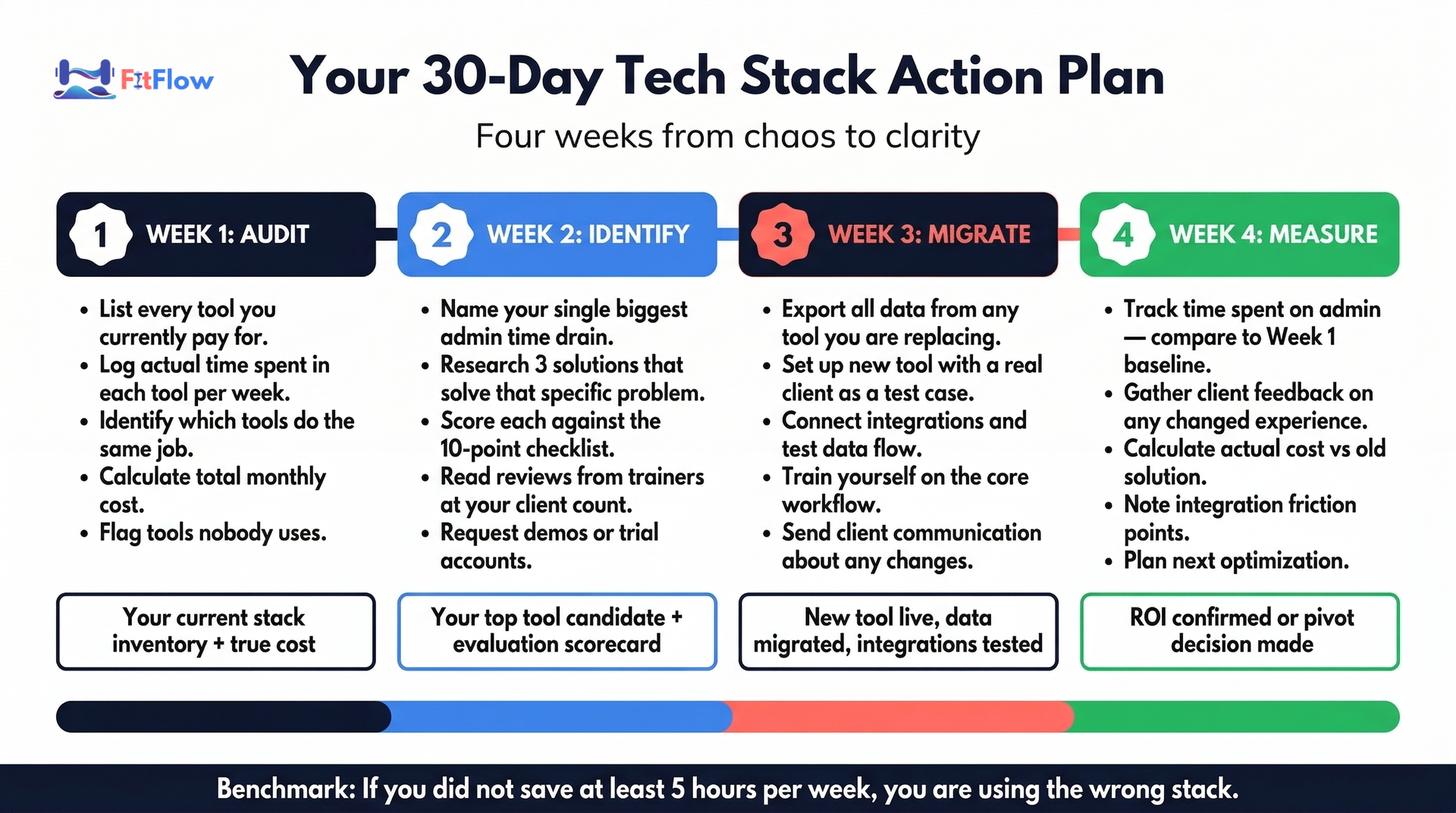
Week 1: Audit Your Current Tools
List every tool you pay for, including free tiers (they still cost you attention).
For each tool, note: Monthly cost, hours used per week, what it connects to, and your satisfaction score (1-5).
Identify redundancies: Any two tools doing the same job? Any tool you pay for but rarely use?
Calculate your current total tech spend (monthly subscriptions + payment processing fees).
Week 2: Identify Your Number One Bottleneck
Review your audit and ask: "Where am I spending the most manual time?"
Common bottlenecks: Scheduling coordination (back-and-forth texts), payment chasing (manual invoicing), client communication (no centralized messaging), or program delivery (email attachments or PDFs).
Research 2-3 solutions for your top bottleneck. Use the 10-point checklist above to evaluate each.
Request demos or trials — most fitness platforms offer 7-14 day free trials.
Week 3: Set Up, Migrate, and Integrate
Commit to your chosen tool and set aside 2-3 hours for initial setup.
Migrate essential data: Client contact info, active programs, payment records. Most platforms have import tools or onboarding support.
Configure integrations: Connect to your calendar, payment processor, and any existing tools.
Notify clients: A brief message explaining the upgrade and how it benefits them (better app experience, easier booking, etc.).
Week 4: Measure and Plan Ahead
Track your time savings: Compare admin hours this week vs. pre-change. Even a rough estimate is valuable.
Note any friction: What is not working smoothly? Most issues are configuration problems, not tool problems.
Calculate your initial ROI using the framework from the earlier section.
Identify your next bottleneck: Repeat the cycle for the next highest-impact improvement.
Key Takeaways
Think in systems, not individual tools. Your tech stack's value comes from how well the pieces work together, not from any single tool's feature list.
Match your stack to your business stage. A solo trainer with 8 clients and a studio owner with 150 members need fundamentally different technology. Buy for today, plan for tomorrow.
Integration is the most underrated evaluation criterion. A good tool that connects natively to your platform beats a great tool that operates in a silo.
Measure your ROI quarterly. If your fitness tech stack is not saving you at least 5 hours per week, audit your tools and their configuration.
Consolidation is the direction the industry is moving. Feed.fm's 2026 report and the broader market data confirm that integrated platforms are replacing fragmented tool collections.
Wearable data integration is a competitive advantage. With 70%+ of wearable users applying their data to exercise decisions (ACSM 2026), trainers who can interpret and act on that data differentiate themselves.
Avoid the five common mistakes: tool hoarding, shiny object syndrome, under-investing at scale, over-investing too early, and ignoring integration.
Start with a 30-day action plan. Audit, identify your biggest bottleneck, fix it, measure the result. Then repeat.
Take the Complete Decision Matrix With You. Download Free Matrix
Build Your Fitness Tech Stack, Then Build Your Business
The fitness technology landscape in 2026 is more capable — and more confusing — than ever. The trainers who succeed are not the ones who adopt every new tool. They are the ones who build intentional, integrated systems that match their business stage and evolve as they grow.
You do not need the most expensive personal trainer software stack. You need the right stack — tools that connect, automate your biggest time drains, and keep your clients engaged between sessions.
If you have read this far, you are already doing more research than most trainers ever will. That matters. The difference between trainers who build sustainable businesses and those who burn out is rarely talent — it is the willingness to treat the business side with the same discipline they bring to programming and coaching.
Start with the 30-day action plan. Audit what you have. Fix your biggest bottleneck. Measure the result. Then do it again.
Consult a healthcare professional before starting any new exercise program. This guide provides general business and technology guidance and does not constitute financial or medical advice.
This guide is updated periodically to reflect new tools, pricing changes, and industry data. Last updated: March 2026.
Disclosure: FitFlow is our product. Where mentioned in this guide, it is listed alongside alternatives and evaluated using the same criteria applied to every tool. This comparison is based on publicly available information as of March 2026. We believe the best way to earn your consideration is to give you the framework to make your own informed decision.
Frequently Asked Questions
Comments