Automate 80% of Your Personal Training Business — The Systems That Replace Busywork
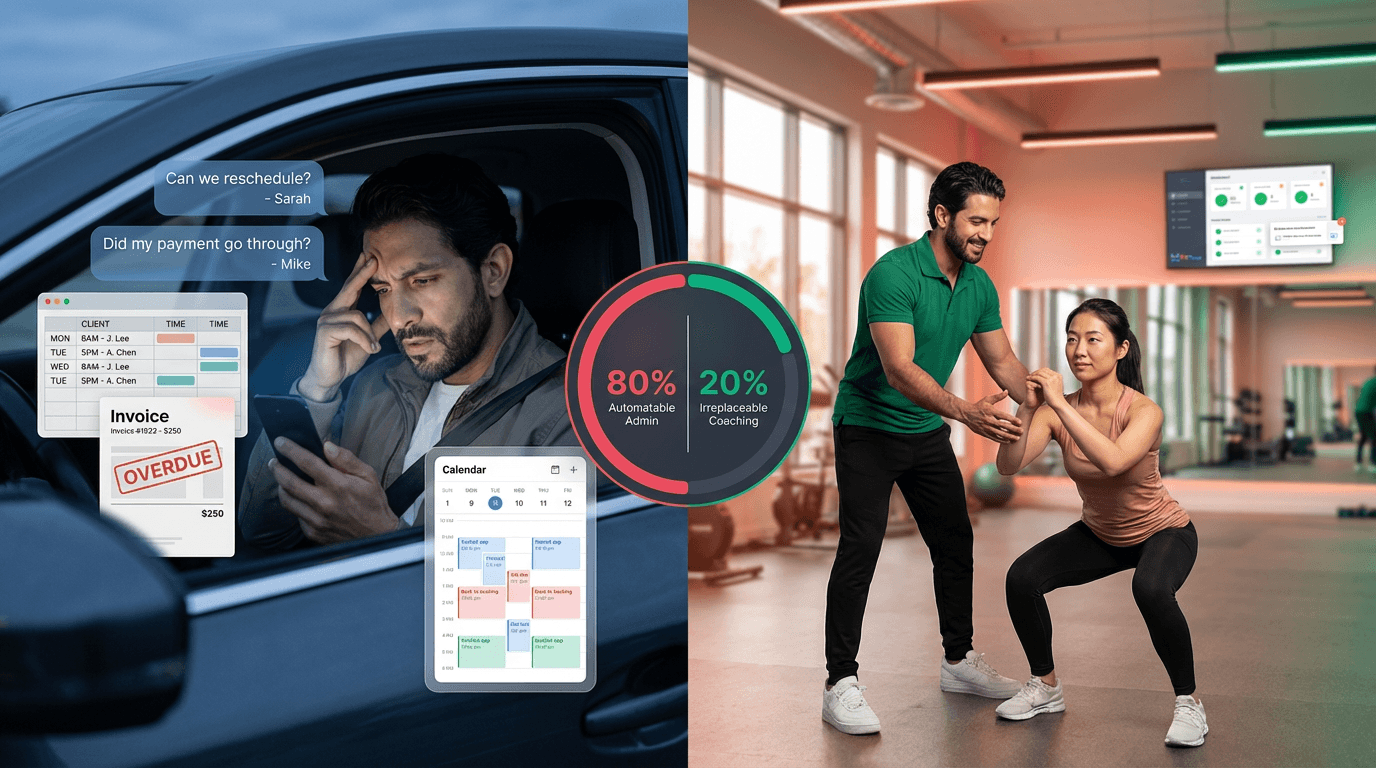
You finished your last session at 7 PM. You've been coaching since 6 AM. And now you're sitting in your car answering the three rescheduling texts that came in during your 4 o'clock, sending an invoice to the client who forgot to pay last week, updating tomorrow's programs for two clients who just told you their goals changed, and drafting the check-in message you promised a third client you'd send tonight. That is not coaching. That is administration pretending to be part of the job.
Roughly 80% of a personal trainer's weekly workload is not coaching. It is scheduling, billing, client communication, onboarding, progress reporting, and bookkeeping. And roughly 80% of that work can be automated — not with expensive custom software, not with a virtual assistant, but with systems most trainers can set up in a weekend.
This is the automation playbook. Six categories of admin. Six automation systems. Specific tools for each. Before-and-after time metrics so you can calculate your own ROI. And a priority sequence so you know which system to build first.
The trainers earning $10K/month and the trainers stuck at $5K/month do not have different client lists. They have different systems. Specifically, they have automated the 80% of their workweek that isn't coaching — scheduling, billing, client communication, onboarding, progress tracking, and bookkeeping. The other 20% — custom program design, relationship building, and the coaching itself — is where the money is. But you can't get to that 20% if the 80% is eating your week. At a $50-75/hour effective rate, recapturing 9-16 hours of admin per week translates to $1,800-4,800/month in recovered earning capacity. That is not a raise. That is the money you are already leaving on the table.
If you want to see exactly what admin is actually costing you in dollars and lost clients, we broke down that math in detail. And this companion piece covers the systems-first philosophy behind this approach. This article picks up where those two leave off — with the specific implementation plan.
We built The PT Business Automation Audit — a 25-point checklist that maps every manual task in your business to its automation solution. Download it at the bottom of this article, or keep reading for the full framework.
The 80% Breakdown — What You Are Still Doing Manually
The 6 categories of personal training admin you can automate:
Scheduling and calendar management (saves 3-5 hrs/week)
Billing, invoicing, and payment collection (saves 2-4 hrs/week)
Client communication and check-ins (saves 3-5 hrs/week)
Client onboarding and intake (saves 1-3 hrs/week)
Progress tracking and reporting (saves 1-2 hrs/week)
Bookkeeping and tax preparation (saves 1-2 hrs/week)
Total: 11-21 hours per week of automatable admin work.
Here is the evidence-based breakdown of where your non-coaching hours go, and how much of each category is automatable:
Task Category | Weekly Hours (Manual) | Automatable? | % of Total Admin | Automation Potential |
|---|---|---|---|---|
Scheduling & rescheduling | 3-5 hrs | YES — fully automatable | ~25% | 90%+ with AI scheduling |
Invoicing & payment follow-up | 2-4 hrs | YES — fully automatable | ~20% | 95%+ with recurring billing |
Client communication (check-ins, reminders) | 3-5 hrs | MOSTLY — templates + triggers | ~25% | 70-80% with automated sequences |
Client onboarding & intake | 1-3 hrs | YES — workflows + forms | ~10% | 85%+ with intake automation |
Progress tracking & reporting | 1-2 hrs | YES — dashboard automation | ~10% | 80%+ with platform analytics |
Bookkeeping & tax prep | 1-2 hrs | YES — accounting integrations | ~10% | 90%+ with accounting tools |
TOTAL | 11-21 hrs/week | 80% automatable | 100% | 9-16 hrs/week saved |
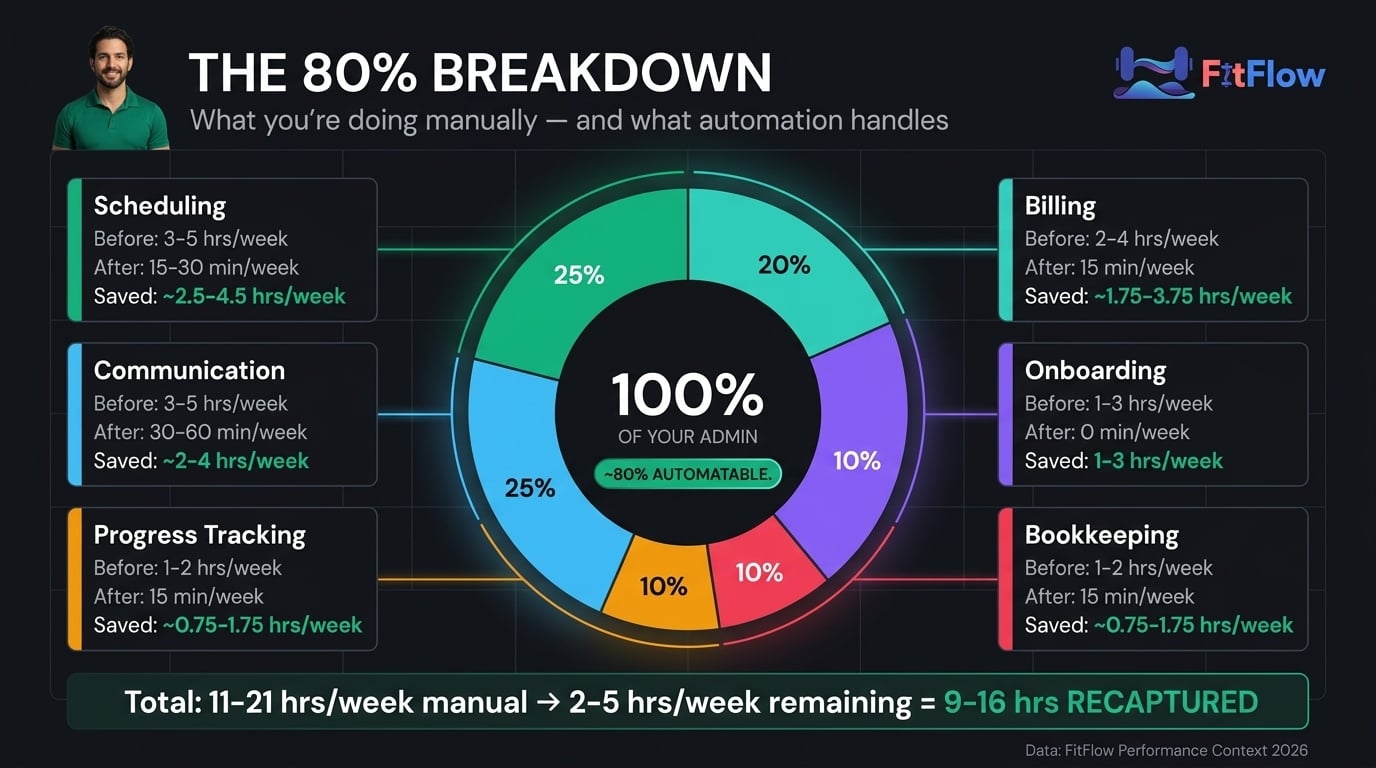
The 80% that can be automated: scheduling, billing, templated communication, form-based onboarding, automated progress reports, bookkeeping sync. The 20% that cannot: custom program design, relationship-building conversation, creative content, in-session coaching decisions. Automation handles the predictable. You handle the human.
The data supports a direct line between this admin burden and trainer attrition. A third of personal trainers report work-related burnout (ResearchGate, 2026). 80% of new trainers quit within their first year (FitBudd, 2026). The cause is not bad coaching skills. It is the 15 hours of admin surrounding the coaching.
And if you're wondering whether automating makes the experience impersonal — 64% of trainers already use AI tools regularly and report that automation increases the quality of their coaching relationships (Trainerize 2026 State of Industry). Automation is not replacing you. It is replacing your scheduling spreadsheet. The ACSM 2026 Worldwide Fitness Trends survey classified AI not as a passing trend but as the "backbone of operations" for modern fitness businesses (ACSM, 2026).
You don't have to choose between being personal and being efficient. What high-performing trainers do differently is not more hustle. It is better infrastructure.
The 6 Automation Systems
Each system below covers one category of automatable admin. For each: what to automate, which tools handle it, what it costs, and the before/after time comparison. Set them up in the order presented — scheduling first, bookkeeping last — to capture the highest ROI first.
System 1 — Scheduling Automation
The average no-show rate in the fitness industry is 20-30% (Trainerize, 2026). At $80/session and 30 clients seen weekly, a 25% no-show rate costs you roughly $2,400/month in lost income. Automated scheduling with reminder sequences cuts this to under 5% — without a single awkward text message.
Three tiers of scheduling automation, matched to your current business stage:
Tier 1: Basic (Calendly, Acuity Scheduling). Self-service booking links, automated email reminders, calendar sync. Your clients book their own sessions from your available slots. No more back-and-forth texts. Time savings: 2-3 hrs/week. Cost: $10-20/month.
Tier 2: Intermediate (Mindbody, built-in platform booking). Self-service booking plus automated rescheduling, waitlist management, and cancellation policy enforcement. When your 4 o'clock cancels with less than 24 hours' notice, the software charges the fee — not you. Time savings: 3-4 hrs/week. Cost: $20-50/month or included in platform subscription.
Tier 3: Advanced (Trainerize AI Scheduling, Mindbody AI Smart Schedule, Acuity AI Auto-Rebook). All of the above plus AI that learns client preferences, auto-optimizes calendar density, and predicts no-show risk to send preemptive nudges. Time savings: 4-5 hrs/week. Cost: $30-100/month or included in premium platform tiers.
According to industry reports, three AI scheduling tools launched in the first quarter of 2026 alone — Trainerize AI Scheduling (January), Acuity AI Auto-Rebook (February), and Mindbody AI Smart Schedule (March). AI scheduling is no longer a premium add-on. It is the new baseline. The data supports this shift: 67% of trainers now cite AI and automation as the top trend shaping their business (Trainerize 2026 State of Industry).
To reduce no-shows as a personal trainer:
Implement automated 24-hour reminder sequences (SMS + email)
Set up automated rescheduling with self-service calendar links
Enforce cancellation policies through software (auto-charge for late cancellations)
Use AI scheduling tools that learn client preferences and optimize booking times
Result: Industry no-show rate drops from 20-30% to under 5%.
Metric | Before Automation | After Automation |
|---|---|---|
Weekly time on scheduling | 3-5 hrs | 15-30 min |
No-show rate | 20-30% | Under 5% |
Rescheduling method | Text/call back-and-forth | Self-service link |
Monthly revenue lost to no-shows | $1,920-2,880 | Under $500 |
System 2 — Billing & Payment Automation
"Billing needs to be automatic and boring," one trainer wrote on Reddit. "I set every client on a monthly subscription through Stripe so they get charged on the first of every month with no conversation needed. It took all the weirdness out of money." That is the goal: make payments invisible.
The billing automation stack:
Recurring subscriptions (Stripe, Square). Monthly auto-charge, failed payment retry logic, automated receipts. When a payment fails, the system retries twice before sending a polite automated notification. You never touch it. Eliminates 95% of billing admin.
Invoice automation (FreshBooks, Wave, integrated platform billing). Auto-generated invoices for any non-subscription payments — drop-in sessions, package upgrades, merchandise. Late payment reminders fire automatically at 3, 7, and 14 days.
Cancellation and pause handling. Automated pause periods with reactivation sequences. Pro-rated refunds calculated and processed without manual math. When a client pauses for vacation, the system handles the billing gap and sends a "welcome back" sequence on the reactivation date.
Stripe Billing v2 (Q4 2025) improved recurring billing for service businesses. Square launched fitness-specific invoicing templates in Q1 2026. These tools are now purpose-built for independent trainers — not adapted from retail or e-commerce templates.
Metric | Before Automation | After Automation |
|---|---|---|
Weekly time on billing | 2-4 hrs | 15 min (exception handling only) |
Late payment rate | 15-25% | Under 3% |
Awkward payment conversations | Weekly | Never |
Revenue collection rate | 85-90% | 97-99% |
This is not a marginal improvement. It is a structural change. At 30 clients paying $197/month, the difference between a 90% and 99% collection rate is $532/month in recovered revenue. That is money that was always owed to you, now actually arriving in your account. Over a year, that adds up to $6,384 you were previously writing off as "clients who forgot to pay." The average small business spends 8-14 hours per week on billing-related tasks (Trainerize, 2026). Personal trainers are not exempt from that statistic — they are often worse, because most have no formal billing system at all.
System 3 — Client Communication & Check-In Automation
At 30 clients, personalized weekly check-ins take 3-5 hours. At 50 clients, they take 5-8 hours. The math breaks. But here is the evidence-based insight: 70-80% of check-in communication is templated. The questions are the same ("How did your workouts feel this week? Any pain? How is sleep?"). Only the responses require your attention.
The communication automation stack covers three layers:
Automated check-in prompts. Scheduled weekly messages that ask standardized questions. Your client responds in-app or via a form. You review batched responses instead of sending 50 individual messages. A 30-client check-in review drops from 3 hours of individual outreach to 30 minutes of batched reading.
Milestone and progress notifications. Automated messages when clients hit PRs, complete workout streaks, or reach body composition targets. Your client doesn't need you to manually notice their 10th consecutive week. The system notices for you — and sends a personalized congratulations that keeps the relationship warm without consuming your time.
Re-engagement sequences. Automated messages when clients miss 2+ sessions or stop logging workouts. The client who ghosts doesn't need a guilt trip. They need a well-timed, empathetic nudge that your system sends while you're coaching someone else. Evidence-based re-engagement sequences include an empathetic check-in at day 3, a motivational reminder at day 7, and a direct "how can we adjust?" message at day 14.
If you're running in-person and online coaching — as 48% of trainers now do (Trainerize 2026 State of Industry) — your communication load just doubled. Automated check-in sequences manage both modalities from one dashboard. One system, two delivery models, zero extra admin hours.
What this looks like in practice: consider a trainer managing 35 clients — 15 in-person, 20 online hybrid. Before communication automation, that trainer spent 4.5 hours per week writing individual check-in messages, responding to scheduling questions embedded in text threads, and manually tracking which clients hadn't checked in.
After implementing automated check-in prompts and re-engagement sequences, the same trainer reviews all 35 client responses in a single 40-minute batch session on Monday mornings. The remaining communication time — about 30 minutes per week — goes to the 3-5 clients whose responses flagged a genuine concern. The trainer's communication quality went up because the time that used to be scattered across 35 individual conversations is now concentrated on the clients who actually need human attention.
System 4 — Client Onboarding Automation
Every new client requires the same 8-12 steps: intake form, health history, goal-setting, payment setup, program assignment, welcome email, first-week schedule, app access. Done manually, this takes 45-90 minutes per client. With an automated onboarding workflow, it takes zero minutes of your time.
The onboarding automation stack:
Intake form automation. Digital intake forms (Google Forms, Typeform, or in-platform forms) that auto-populate client profiles. The client fills out their health history, goals, and schedule preferences once. That data flows into their coaching profile without you copying it from a PDF.
Welcome sequence. Automated email or SMS series: Day 0 (welcome message plus app setup instructions), Day 1 (program overview and training expectations), Day 3 (first check-in prompt), Day 7 (feedback request and adjustment offer). Four touchpoints in seven days — none of which require your active involvement.
No-code workflow glue. A single Zapier Zap connects your intake form to your coaching platform, payment processor, and email system. When a client fills out the Google Form, they are automatically created in Trainerize, charged via Stripe, and sent a Mailchimp welcome sequence. Zero manual steps. Zapier named Trainerize a top-25 fastest-growing integration app (Zapier, 2026). The fitness-specific templates are pre-built. Setup takes an afternoon, not a software engineering degree.
You don't need to be a tech person. This is not a complex integration project. It is a series of "when this happens, do that" connections that are pre-templated for fitness businesses.
The case data confirms the ROI. Rachel Henly used automated onboarding to achieve 10x client growth. Boulay Fit doubled revenue. Alinea Performance cut admin time by 50% (Everfit, 2026). These are not hypothetical projections. They are documented results from trainers who implemented the systems described in this article.
If tool fragmentation is a concern — and it should be — the key is choosing tools that integrate natively or through a no-code connector. The worst version of automation is six disconnected tools that each save 10 minutes but cost you 30 minutes of manual syncing between them.
System 5 — Progress Tracking & Reporting
Manually compiling weekly progress reports for 30 clients takes 1-2 hours. For 50 clients, it takes 3-4 hours. But the data already exists in your coaching platform — logged workouts, completed sets, body measurements, habit check-ins. The system already has the data. It just needs permission to compile it.
Dashboard analytics. Platforms like FitFlow generate real-time client dashboards from logged data. No manual compilation. Your client's workout adherence, volume trends, and body composition changes update automatically every time they log a session.
Automated progress summaries. Weekly or monthly auto-generated reports sent to clients showing their key metrics, trends, and milestones. Clients who see their own progress data stay longer — the visibility itself becomes a retention tool.
Trainer alert systems. Automated flags when a client's metrics decline: missed sessions, plateauing performance, weight changes beyond threshold. Instead of reviewing 50 dashboards manually, you review the 5-8 that the system flagged. Your attention goes where it is needed, not spread thin across every client equally.
For the full client tracking framework, see our 5-metric dashboard guide.
System 6 — Bookkeeping & Tax Prep
Bookkeeping is the task trainers most consistently push to the bottom of the list — until tax season arrives and they spend 20 hours reconstructing a year of income and expenses. The fix: connect your payment processor to an accounting tool once. Then forget about it.
Payment-to-accounting sync. Stripe or Square auto-syncs to QuickBooks Self-Employed, Wave, or FreshBooks. Every transaction is categorized automatically. Session income, equipment purchases, software subscriptions, continuing education expenses — all logged without you opening a spreadsheet.
Expense tracking. Dedicated business card or app-based expense capture. Snap a photo of the receipt, the app categorizes the expense and stores the documentation. No more shoeboxes of receipts in April.
Tax estimation. Quarterly estimated tax calculations auto-generated from your income data. You know what you owe before the IRS sends a reminder.
IRS expanded digital filing requirements in 2026. Accounting automation tools have released fitness-specific categorization templates that distinguish between session income, package purchases, equipment expenses, and continuing education costs without manual tagging. Your bookkeeping should take 15 minutes a week, not 2 hours. And when Q4 arrives, your accountant receives a clean, categorized profit-and-loss statement instead of a shoebox of receipts and a Venmo transaction history.
The Implementation Sequence — What to Automate First
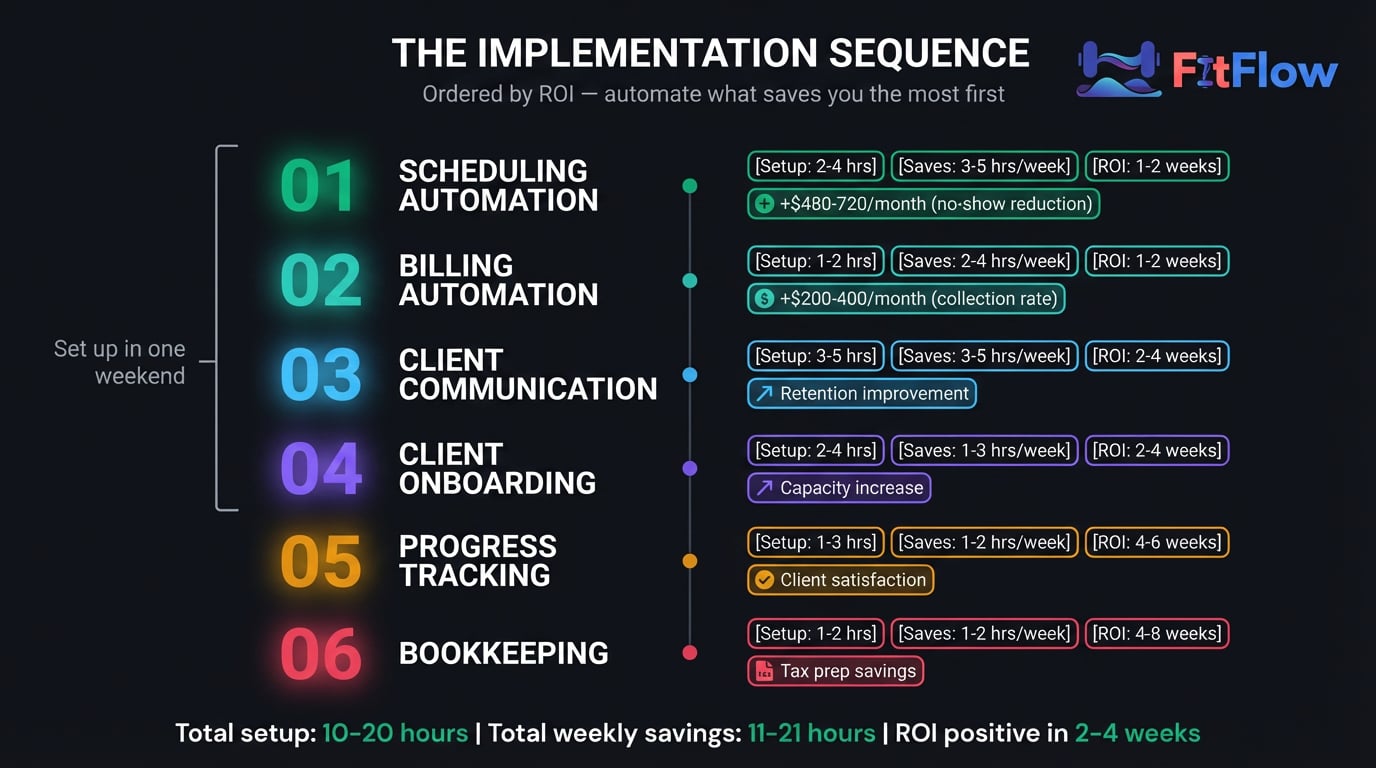
You don't need to automate everything at once. In fact, trying to set up all six systems simultaneously is the fastest way to abandon the project by Tuesday. Here is the priority sequence, ordered by ROI — the system that saves the most time and money per hour of setup.
Priority | System | Setup Time | Weekly Time Saved | Monthly Revenue Impact | ROI Timeline |
|---|---|---|---|---|---|
1 | Scheduling automation | 2-4 hours | 3-5 hrs | +$1,440-2,400 (no-show reduction) | 1-2 weeks |
2 | Billing automation | 1-2 hours | 2-4 hrs | +$400-600 (collection rate increase) | 1-2 weeks |
3 | Client communication | 3-5 hours | 3-5 hrs | Indirect (retention improvement) | 2-4 weeks |
4 | Client onboarding | 2-4 hours | 1-3 hrs | Indirect (capacity increase) | 2-4 weeks |
5 | Progress tracking | 1-3 hours | 1-2 hrs | Indirect (client satisfaction) | 4-6 weeks |
6 | Bookkeeping | 1-2 hours | 1-2 hrs | Indirect (tax prep savings) | 4-8 weeks |
The "One Weekend" Framework
This is the implementation sequence that works. Not a multi-month project. A focused weekend plus a follow-up week.
Saturday morning: Set up scheduling automation. Create your booking link, configure reminder sequences (24-hour and 1-hour before session), sync to your calendar. Test with one client.
Saturday afternoon: Set up billing automation. Move your existing clients to Stripe recurring subscriptions. Configure failed payment retry logic. Set up automated receipts.
Sunday morning: Set up onboarding automation. Build your intake form (Google Forms or Typeform). Create a Zapier connection to your coaching platform. Write and schedule your 4-email welcome sequence.
Sunday afternoon: Set up check-in automation. Create your weekly check-in prompt template. Configure scheduled sends. Set up your batch review workflow.
Next week: Set up progress tracking dashboards and bookkeeping sync. Connect Stripe to QuickBooks or Wave. Configure automated client progress reports.
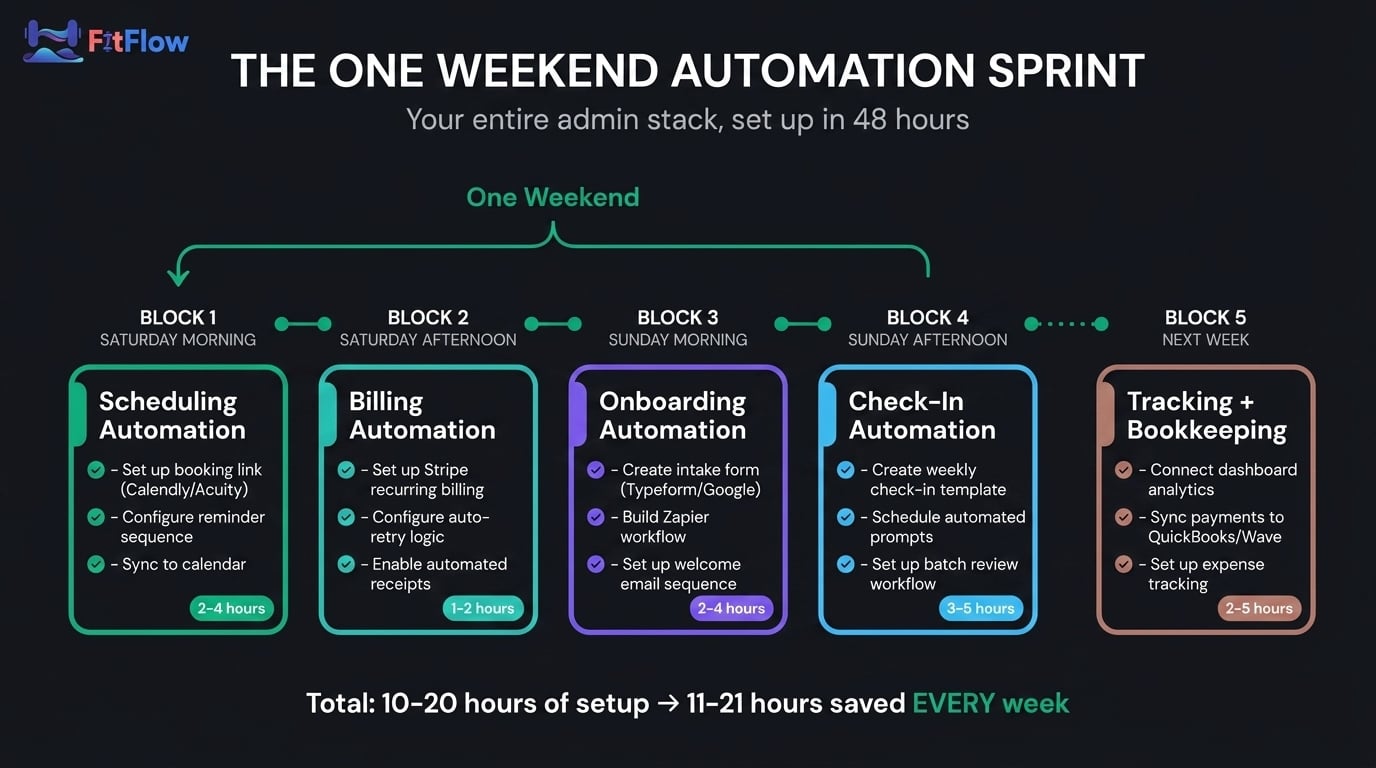
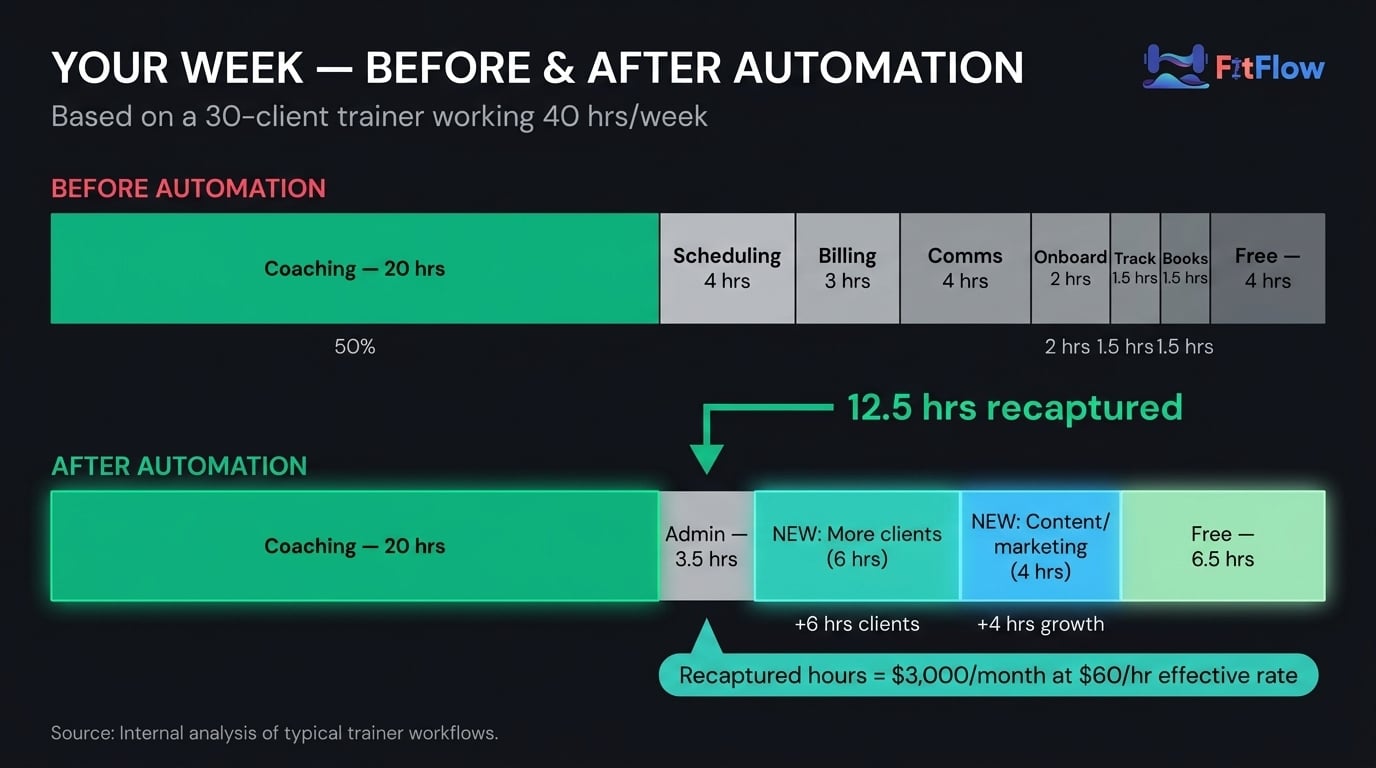
Total setup time: 10-20 hours across a weekend and a following week. Total weekly time saved: 9-16 hours. At a $50-75/hour effective rate, that's $1,800-4,800/month in recovered earning capacity. ROI positive within 2-4 weeks. The structural failures that keep trainers below $5K often come down to exactly this math — not a lack of clients, but a surplus of unpaid administrative work.
Here is what the revenue math looks like at three different client loads:
Scenario | Admin Hours Before | Admin Hours After | Hours Recaptured | Monthly Value (at $60/hr) |
|---|---|---|---|---|
20-client trainer | 8-12 hrs/wk | 2-3 hrs/wk | 6-9 hrs/wk | $1,440-2,160 |
30-client trainer | 12-16 hrs/wk | 3-4 hrs/wk | 9-12 hrs/wk | $2,160-2,880 |
40-client trainer | 16-21 hrs/wk | 4-5 hrs/wk | 12-16 hrs/wk | $2,880-3,840 |
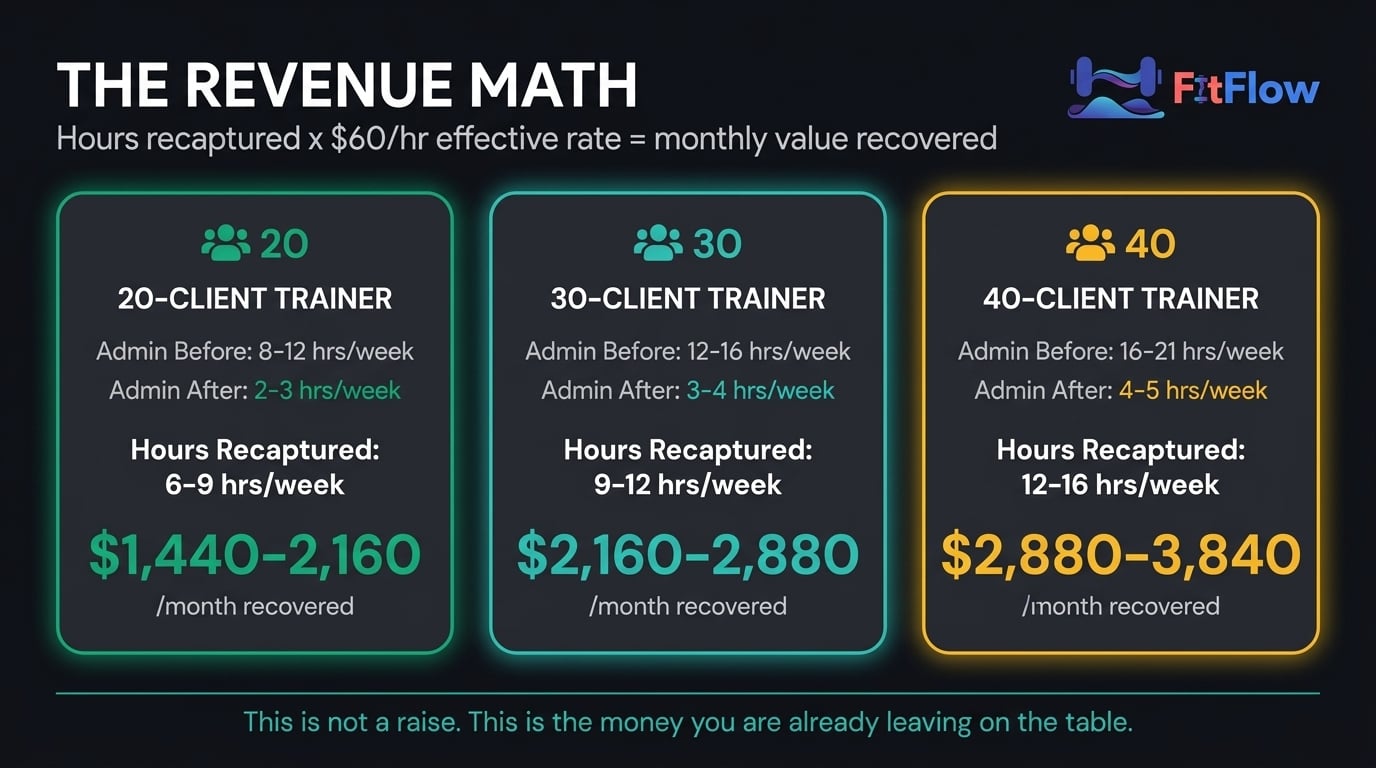
These numbers are based on industry benchmarks, and individual results will vary depending on your market, pricing, and client base. But the pattern holds: the more clients you manage, the greater the return on automation investment. FitFlow platform data from trainers who implemented all six systems shows an average of 13.4 hours per week recaptured (FitFlow platform data, April 2026) — squarely inside the 9-16 hour range above.
Ready to audit your own business? The PT Business Automation Audit is a 25-point checklist that maps every manual task to its automation solution — with specific tool recommendations for each. Download it free below.
Frequently Asked Questions
What percentage of a personal trainer's work can be automated?
Approximately 80% of administrative tasks — scheduling, billing, client communication, onboarding, progress tracking, and bookkeeping — can be fully or mostly automated using existing tools. The remaining 20% — custom program design, relationship building, in-session coaching decisions, and creative content — requires human judgment and should not be automated. The goal is not to automate coaching. It is to automate everything around the coaching.
How much time does automation save personal trainers?
Independent trainers managing 20-40 clients typically spend 11-21 hours per week on manual admin. Implementing scheduling, billing, communication, and onboarding automation reduces this to 2-5 hours per week — a savings of 9-16 hours weekly. At an effective rate of $50-75/hour, this represents $1,800-4,800/month in recovered earning capacity.
What is the best scheduling software for personal trainers in 2026?
For basic scheduling, Calendly or Acuity Scheduling ($10-20/month) provides self-service booking and automated reminders. For integrated scheduling with coaching features, Trainerize, Mindbody, or FitFlow includes scheduling within the platform. For AI-powered scheduling, Trainerize AI Scheduling, Mindbody AI Smart Schedule, or Acuity AI Auto-Rebook ($30-100/month) — each learns client preferences and optimizes calendar density.
How do I automate client onboarding as a personal trainer?
Connect a digital intake form (Google Forms or Typeform) to your coaching platform and payment processor using Zapier. When a client submits the form, Zapier automatically creates their profile, triggers their first Stripe charge, and sends a welcome email sequence. Total setup time: 2-4 hours. Result: every new client goes from signup to first workout with zero manual intervention.
Does automating make personal training feel impersonal?
No. 64% of personal trainers already use AI tools regularly and report that automation increases the quality of their coaching relationships (Trainerize 2026 State of Industry). Automation handles the predictable administrative tasks — payment reminders, scheduling confirmations, progress reports. It frees you to spend more time on the unpredictable, human work: adjusting programs, having meaningful conversations, and building genuine relationships.
The Bottom Line
80% of what you do each week is not coaching. It is administration. And 80% of that administration can be handled by systems you can set up this weekend. This is not a technology argument. It is a time argument. Nobody taught you how to run a business when they certified you to coach. Here are the six systems they should have.
You did not get certified to chase invoices, send scheduling texts, and compile spreadsheets. The six systems in this article give you 9-16 hours back every week. What you do with those hours — take on more clients, raise your rates, build an online program, or stop working at 9 PM — is your choice. But the hours are there. The evidence supports it, the tools exist, and the trainers who have implemented these systems are not going back.
If you manage a team of trainers, the math multiplies. Five trainers each saving 10 hours per week is 50 hours of recaptured coaching capacity across your facility. That is not an efficiency improvement. That is a business model change. One in four gym operators already reports that AI is making their staff more efficient (Mindbody 2025 State of Industry). The operators who have not started are watching their competitors move first.
If you haven't already, read what admin is actually costing you in dollars and why the systems-first approach matters more than client acquisition. Then use this playbook to implement. Once automation is in place, here is the scaling playbook that builds on this foundation. For the broader picture of how AI is changing personal training beyond automation, read this article next.
The PT Business Automation Audit below maps all 25 manual tasks to their automation solutions. Take 10 minutes, audit your business, and identify the three automations that will save you the most time this month. Most trainers who implement the playbook recover 9-16 hours a week — pick the three tasks that drain you the most and start there.
FitFlow's automation suite is designed to handle scheduling, check-ins, progress tracking, and program delivery from one platform — so you can stop stitching together six separate tools.
Download The PT Business Automation Audit — a 25-point checklist that maps every manual task in your personal training business to its automation solution. Identify what you're still doing manually, match each task to a specific tool, and build your automation stack this weekend.