
Systems Over Tools: The Operating Layer Every Trainer Stack Is Missing

Open your software dashboard. Count the logins.
If you are like most independent personal trainers in 2026, you stopped at somewhere between four and seven — a programming app, a billing system, a messaging tool, a scheduling layer, a notes document that calls itself a CRM, and one or two more that you forgot you were paying for. The ABC Fitness 2026 State of the Industry report puts the median independent trainer at 4.7 active subscriptions, with a long right tail toward eight and nine. The IHRSA 2026 Trainer Operations Brief puts the median monthly software spend at $312, with the middle 60% of trainers between $180 and $520 a month. The 91% AI-adoption figure from the FitBudd 2026 AI in Coaching Report is the loudest of the year, but only 64% of those coaches report that the new AI features improved their efficiency; the remaining 36% are mixed or negative. Tool adoption is not the problem. The problem is that the tools are not producing better operations.
If you have read our piece on the cost of a fragmented tech stack, this article is the next question. That piece diagnoses the cost. This one explains why the cost keeps showing up no matter which tool you switch to, and what you have to build before any stack will hold. It is also distinct from why fitness apps fail, which is about client-side software, and from better systems, not more clients, which argues for operational systems over acquisition obsession. This post sits one layer up: it is about how you reason about technology itself.
Want a head start? If you would rather diagnose your own stack before reading further, the Trainer Systems Architecture Blueprint is a fillable worksheet, 7-question diagnostic, and tool-selection matrix in one PDF. It takes roughly 60 to 90 minutes to complete.
The diagnosis: you do not have a tool problem
You have a systems problem, and the tool is taking the blame.
Here is how it shows up. You evaluate a new app — Trainerize versus TrueCoach versus PT Distinction versus a spreadsheet you keep meaning to retire. You migrate. For three weeks it feels better. By month two, the same complaints surface in a new shape: programming takes too long, client check-ins fall through cracks, billing is opaque, integrations break, your inbox swells. By month four you are scanning listicles again. ABC Fitness reports that 38% of independent trainers migrated at least one tool in the last twelve months; the migration cost shows up as lost setup time, duplicated admin, disrupted client workflows, and the quiet drag of rebuilding habits around another interface.
The mechanism is simple, and it is not unique to fitness. A vendor designs software for the median user. The median user is, definitionally, not you. The vendor cannot encode the specific decision rules that govern your onboarding, your communication cadence, your billing exceptions, or the way you decide which client gets a check-in nudge on Tuesday and which one gets left alone. When you adopt a tool before you have decided how those things should work, the tool becomes the system by default — and the system you accidentally inherit is built for someone else.
The trainers who scale, retain clients, and protect their evenings are not the ones with the best stack. The VERVE Pulse 2026 Coach Survey reports the same pattern qualitatively: the top quartile of coaches by retention runs leaner toolsets, not richer ones. They are the ones who designed how their business should work before they decided which apps would execute that design. Tools amplify systems. Without a system, tools amplify chaos.
If that sounds abstract, it gets concrete fast. The next section defines the words.
System vs tool: a working definition
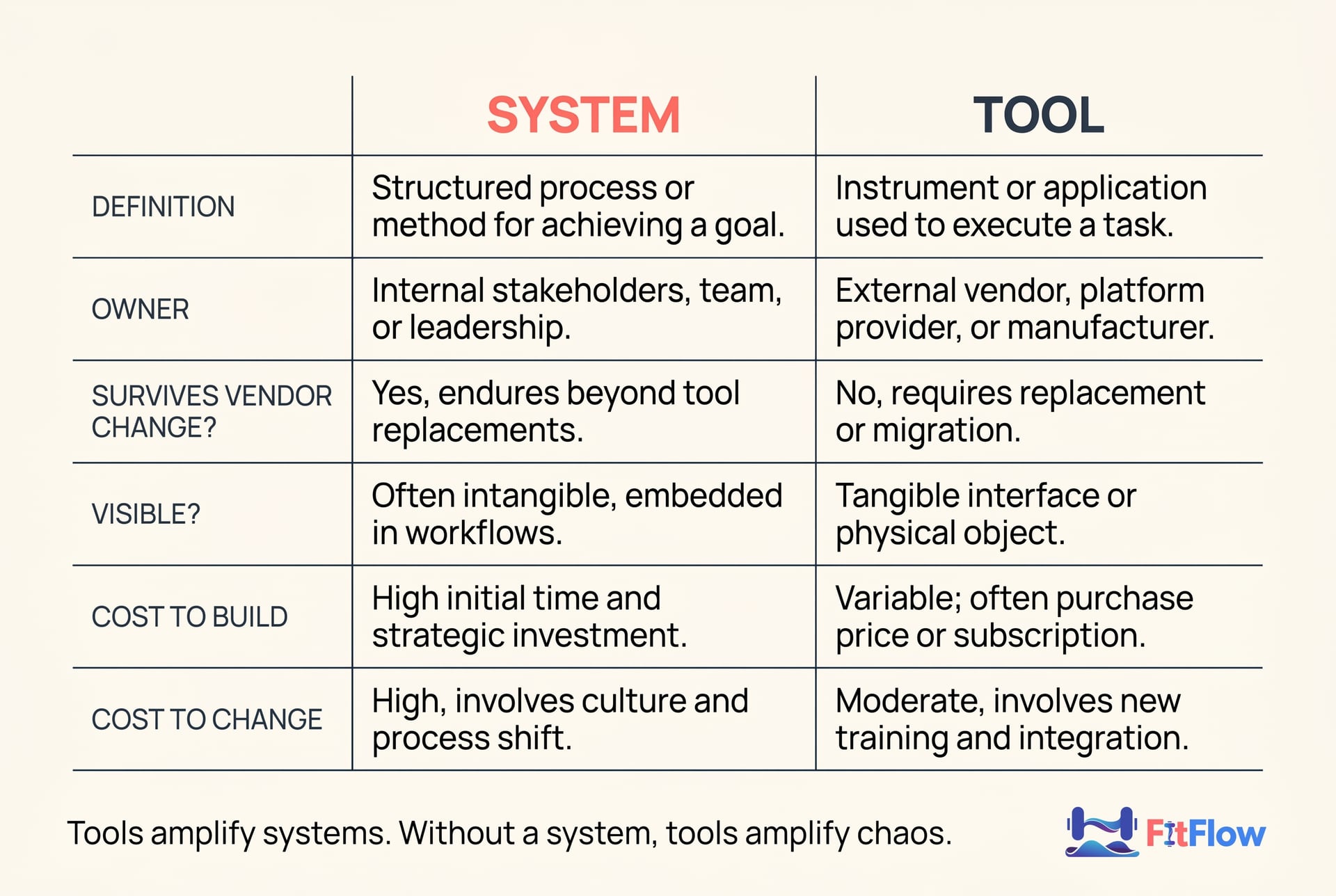
A system is a set of decision rules + a data flow + a cadence + an escalation path, encoded so it survives a bad day. A tool is the runtime that executes those rules. The system is what you are doing. The tool is where the doing happens.
Most trainers, when asked to describe their "system," describe their tool. They say "Trainerize" or "TrueCoach" or "my Notion setup," and they stop there. None of those answers are systems. They are runtimes. The system is the layer above: what gets decided, by whom, with what inputs, on what cadence, with what fallback when the trainer is sick or the client ghosts.
The Deloitte 2025 Digital Operations Report — focused on small operator businesses, including fitness — found that companies with documented decision rules and workflow encoding before tool selection report 2.1× to 3.4× higher tool-ROI in their first 18 months than companies that select tools first. The McKinsey 2025 Operations Productivity report places the lift in the 30% to 65% range for service businesses specifically. The exact number is less important than the direction: when the system is built first, the tool compounds. When the tool is bought first, the tool absorbs whatever shape it can — and the shape it absorbs is rarely yours.
Tara, an established trainer with 50 to 120 clients across 1:1, group, and online formats, sees this most acutely. Tara typically runs six to ten tools across her team, has experienced at least one integration breakage in the last 30 days, and is considering a replatform but afraid of the disruption. Her monthly software spend sits between $400 and $1,200. For Tara, the cost of the wrong system encoded in the wrong tool is not $400 a month — it is the cumulative drift of the team's behavior toward the tool's defaults, away from her business's actual logic.
The 4-layer architecture every trainer stack needs
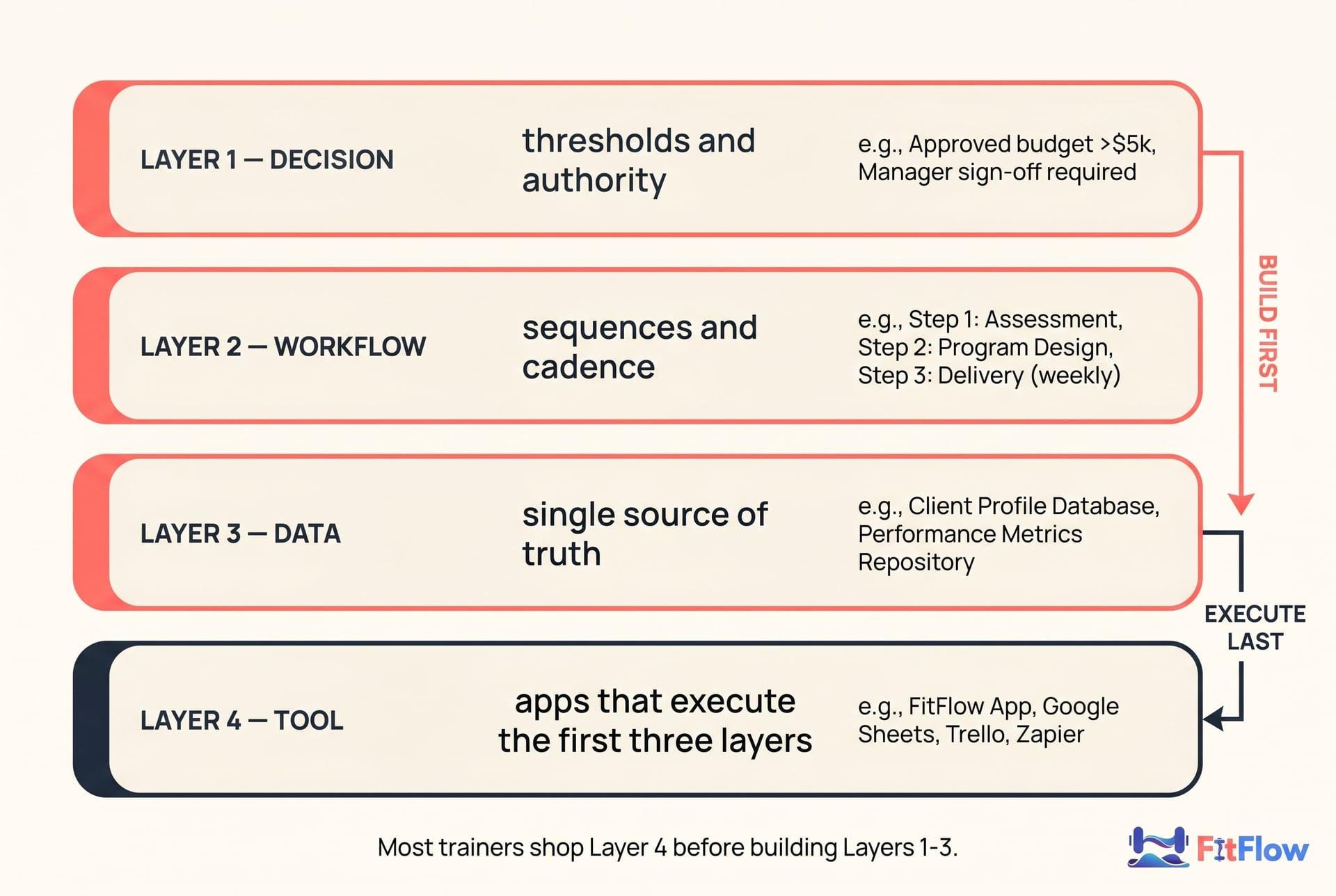
Every functional trainer business runs on four layers, whether you have named them or not. The trainers who feel in control have built all four explicitly. The trainers who feel buried have only built one — Layer 4, the tool.
Layer 1 — Decision Layer
What gets decided, by whom, with what thresholds.
Example decisions: When does a missed check-in escalate from "send a nudge" to "call the client"? At what attendance percentage does a client move from on-track to at-risk? How is pricing tiered, and who has authority to grant an exception? What is the rule for refunding a no-show?
Most trainers carry these decisions in their head. A documented Decision Layer pulls them onto paper or into a shared doc with explicit thresholds: 7 days missed → nudge; 14 days missed → call; below 60% attendance for a 30-day rolling window → at-risk flag. The ACSM 2026 Professional Practices Survey found that trainers with documented escalation thresholds report 22% to 41% fewer at-risk clients per quarter than trainers with implicit thresholds.
Layer 2 — Workflow Layer
The sequences, cadences, and triggers that execute the decisions.
Example workflows: Day 1 onboarding sequence (welcome, intake, goal set, first session). Weekly check-in cadence (Monday async, Thursday voice memo, monthly call). Renewal cycle (45 days out → renewal conversation; 30 days → contract refresh; 15 days → final). Escalation triggers from Layer 1, written as sequences.
This is where AI features in 2025-2026 are concentrated — Trainerize's AI-assisted program generation, TrueCoach's AI message drafting, Hexfit's AI program library, and PT Distinction's risk scoring. None of these is useful if Layer 1 hasn't been built first. AI augments a workflow. It does not invent one. (More on what AI actually changes for trainer-side coaching.)
Layer 3 — Data Layer
The single source of truth for each thing you track, the schema, and who owns it.
Example: Client weight is logged in the programming app. Adherence is logged in the messaging app. Billing is logged in Stripe. Notes are in a Google Doc. If you cannot answer "where does the canonical version of client X's last six weeks of training adherence live?" in one sentence, you do not have a Data Layer. You have a data scatter. The Mindbody 2026 Wellness Index found that 71% of fitness consumers expect a digital-native experience; you cannot deliver that consistently if the data is fragmented across four tools none of which agree.
Wearable data is a special case of this. As we covered in the wearable data problem, data only becomes signal inside a system that defines what signal means: low recovery → reduce volume, three missed sessions → check in, rising resting heart rate + poor sleep → ask before adjusting the plan. The Data Layer is where that definition lives.
Layer 4 — Tool Layer
The apps that execute Layers 1, 2, and 3.
This is the layer most trainers shop for first and design for last. The right tool is the one that executes your decisions, your workflows, and your data flows with the fewest workarounds. The wrong tool is the one whose defaults overwrite yours.
Our tool comparison guide is the right resource — after you have built Layers 1 through 3. Before that, it is a list of runtimes for a program you have not yet written.
Already see where your stack breaks down? The Trainer Systems Architecture Blueprint walks you through a 4-layer audit with a fillable worksheet for each layer. It takes 60 to 90 minutes the first time.
The 7-question diagnostic: is the bottleneck your system or your tool?
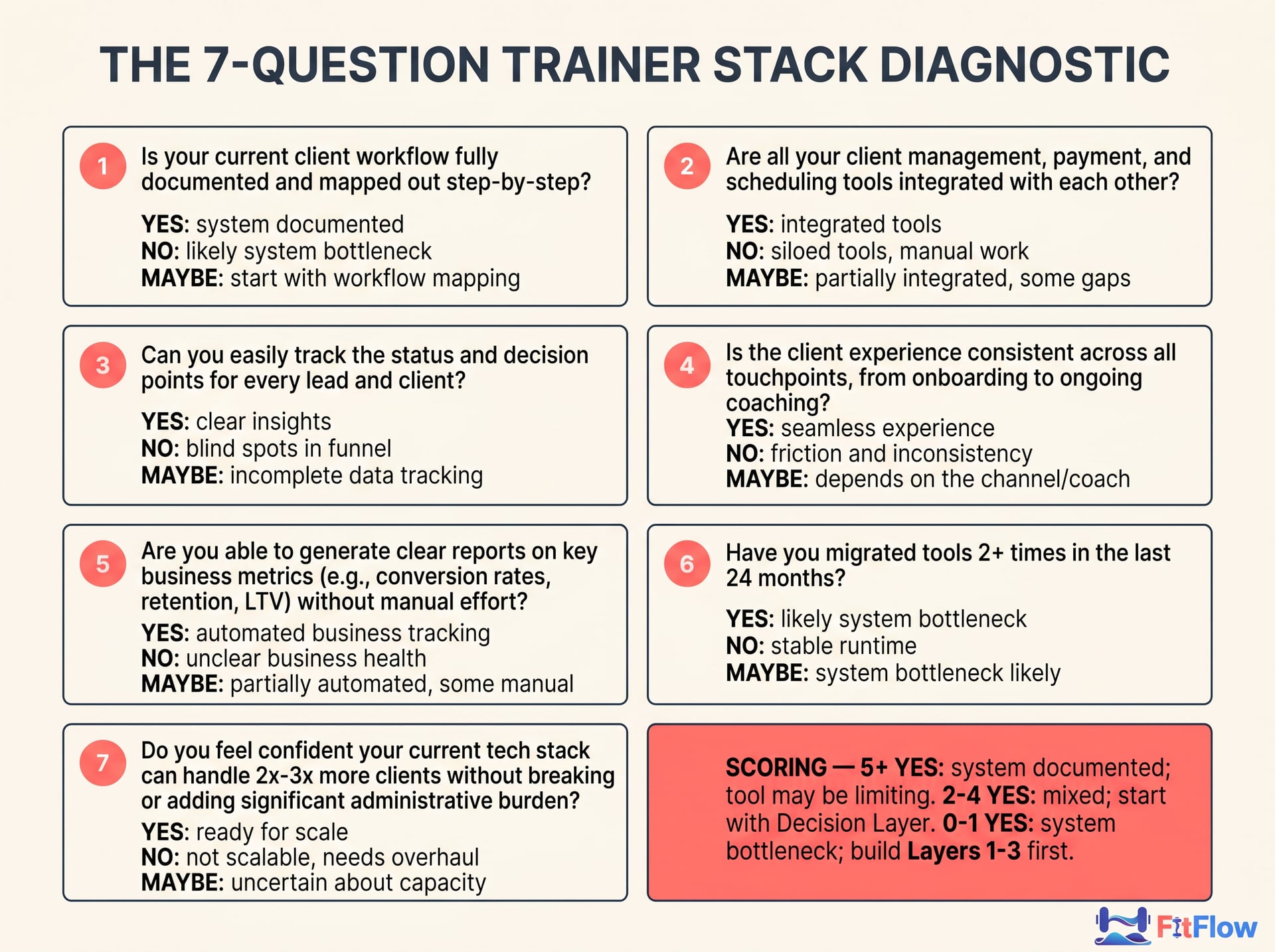
The ISSA 2026 Trainer Tech Brief estimates that in roughly 85% to 92% of trainer-software complaints, the root cause is a missing or undocumented system, not a tool deficiency. The remaining 8% to 15% are genuine tool limits. Use the 7 questions below to place yourself.
# | Question | If YES → | If NO → | If MAYBE → |
|---|---|---|---|---|
1 | Do you have a documented onboarding sequence that another trainer could execute? | System OK on onboarding | System bottleneck on onboarding | Mixed; start at Decision Layer |
2 | Can you answer "what is the canonical record for client X's adherence last week?" in one sentence? | Data Layer OK | Data Layer bottleneck | Likely Data Layer bottleneck |
3 | Do you have written thresholds for when a client moves from on-track to at-risk? | Decision Layer OK on retention | Decision Layer bottleneck | Decision Layer bottleneck |
4 | When you took a 7-day break in the last year, did your business run without daily intervention? | System has cadence | Workflow Layer bottleneck | Workflow Layer bottleneck |
5 | If your main app vendor doubled prices tomorrow, could you migrate without losing 30+ days of work? | Data Layer + Decision Layer documented | Data Layer bottleneck | Data Layer bottleneck |
6 | Have you migrated tools 2+ times in the last 24 months? | Tool-shopping pattern — likely system bottleneck (counterintuitively) | Stable runtime | System bottleneck likely |
7 | Could a new hire onboard a new client end-to-end from your written process in their first week? | Workflow + Decision documented | Workflow bottleneck | Workflow bottleneck |
Scoring:
5 or more YES answers → system is documented; if you still feel buried, the tool may genuinely be limiting. Reach for the tool comparison guide.
2 to 4 YES answers → mixed. Start with the Decision Layer; tool conversations are premature.
0 to 1 YES answers → system bottleneck. Switching tools will not help. It will reset the clock on the same problem. Build Layers 1 through 3 first.
If you are Carl — 18 to 32 active clients, four to seven software subscriptions, $180 to $520 per month in software spend, seven to eleven hours per week lost to tool-to-tool data transfer, two or more tool migrations in the last 24 months, no documented onboarding sequence — the odds are above 80% that you scored 0 to 2 here. That is the population this diagnostic was built for.

Before and after: 22 clients, 5 tools → 22 clients, 3 tools, one documented system
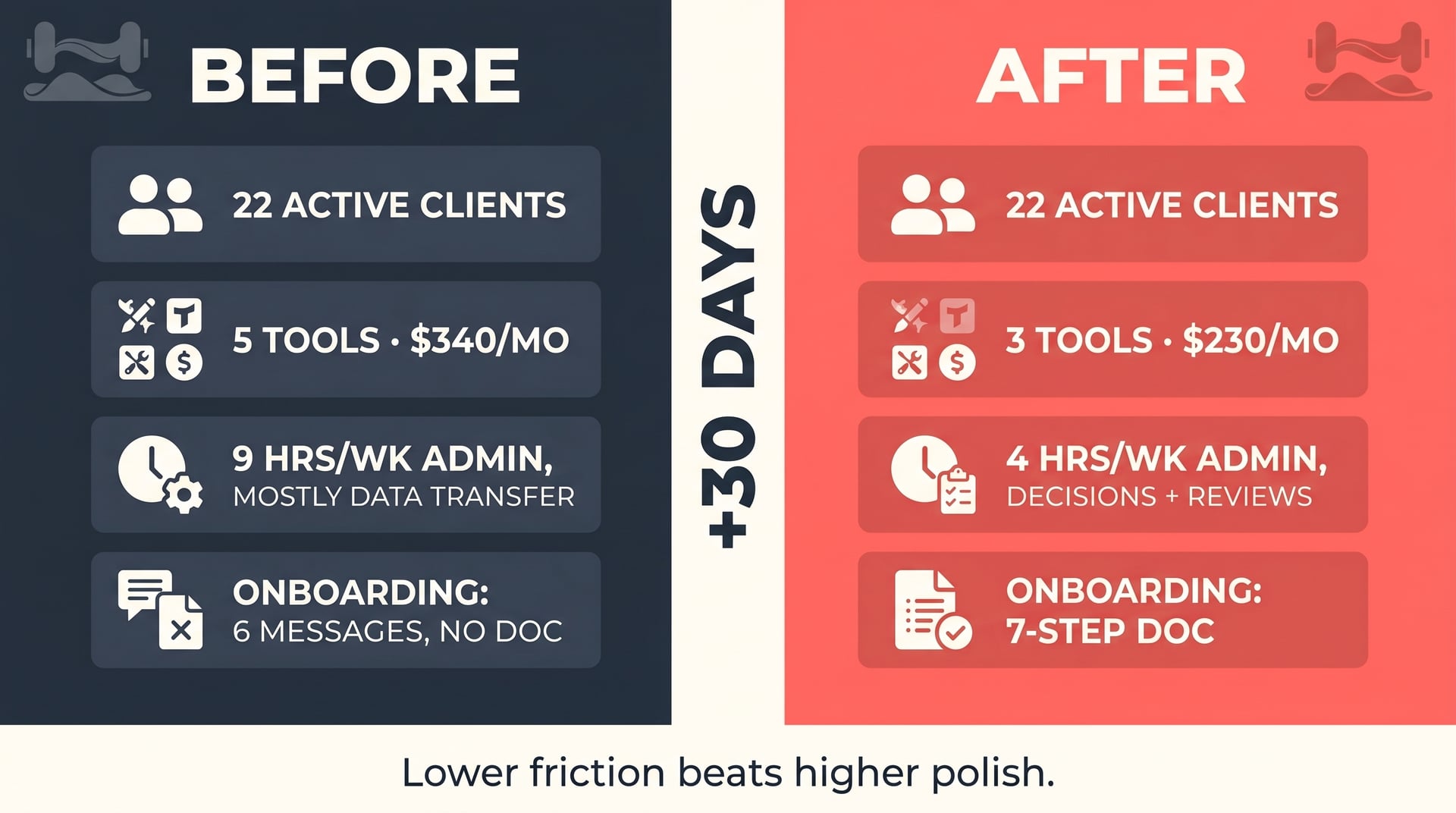
Here is what the diagnostic looks like applied. Names changed; the profile is composite, drawn from the persona's documented thresholds.
Before (typical Carl profile)
22 active clients
5 tools: Trainerize for programming, Stripe for billing, Calendly for scheduling, WhatsApp for messaging, a Google Sheet for the "real" notes
Weekly admin: 9 hours, mostly retyping or copy-pasting between tools
Onboarding: roughly 6 messages, no documented sequence; new clients receive slightly different things depending on which week they sign
Last 12 months: migrated programming app once, considered migrating billing twice
Software spend: $340 per month
The 4-layer audit reveals:
Layer 1 (Decision): undocumented. No threshold rules for at-risk flags, refunds, or pricing exceptions.
Layer 2 (Workflow): partial. Trainerize's defaults are executing the workflow, not Carl's design.
Layer 3 (Data): fragmented across 5 tools, with the Google Sheet as the de facto canonical record — but only when Carl manually syncs it.
Layer 4 (Tool): not the problem.
After 30 days of working through the playbook below
22 active clients (no change — this is not a growth play)
3 tools: Trainerize for programming + messaging + scheduling, Stripe for billing, a single Google Doc per client as the canonical adherence record
Weekly admin: 4 hours, mostly Layer 1 decisions and Layer 2 reviews — not data transfer
Onboarding: documented 7-step sequence; client experience is consistent regardless of signup week
Software spend: $230 per month
Tradeoff: the Google Doc system is less elegant than a purpose-built CRM but it is Carl's schema and he owns it; lower friction beats higher polish at this stage
This is not a maximalist outcome. Carl did not 10× anything. The mid-range trainer in the ABC Fitness 2026 dataset saves 4 to 7 hours per week and $80 to $180 per month from a stack consolidation of this shape. The bigger gain is harder to measure: the time he is no longer spending thinking about the stack. That is the gain that compounds.
The 30-day conversion playbook
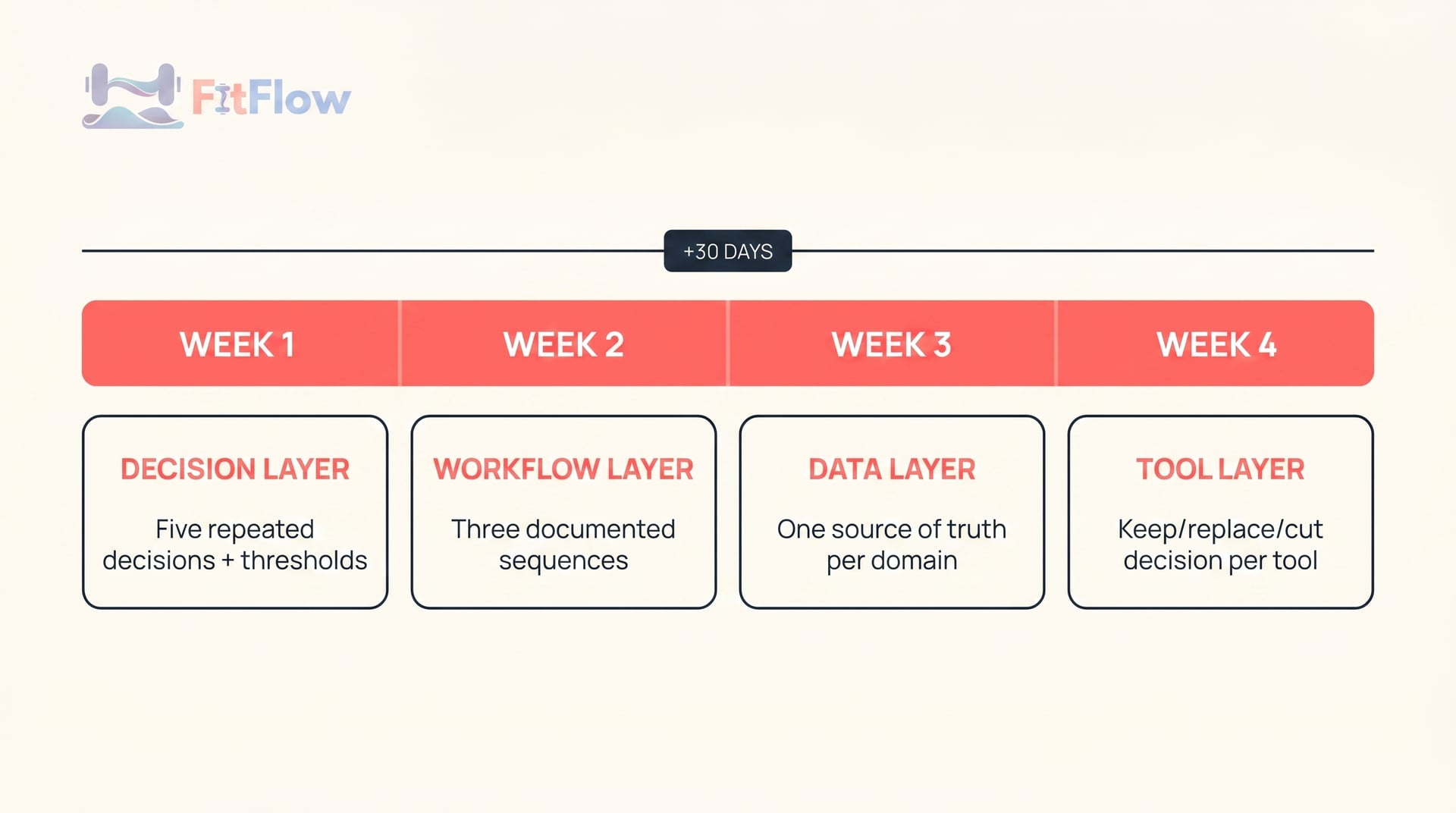
No replatforming. No new tools. Just a 30-day retrofit that turns your existing chaos into a 4-layer architecture you can actually maintain.
Week 1 — Decision Layer audit
Deliverable: A one-page document listing your five most-repeated decisions, with explicit thresholds.
Pick the five decisions you make most often. For Carl, this is usually: (1) when to nudge a missed check-in, (2) when to escalate a missed check-in to a call, (3) when to flag a client as at-risk, (4) how to handle a no-show, (5) when to start a renewal conversation. For Tara, add: (6) when to assign a client to a junior coach, (7) when to escalate to her personally. For Amanda — 0 to 5 clients, NASM/NSCA cert under 120 days old, currently choosing between Trainerize, TrueCoach, Excel, and Notion, having read three or more "best fitness apps" listicles in the last 30 days — the work is even more compressed: write down the three decisions you will face in your first quarter and pre-decide them.
Write the thresholds in plain language. "7 days no check-in → send a templated nudge. 14 days → call." That is the document. Resist the urge to make it pretty.
Week 2 — Workflow Layer encoding
Deliverable: Three documented sequences — onboarding, check-in cadence, escalation.
Pick the three workflows that consume most of your week and write down what currently happens, step by step. Not what you wish happened. What actually happens. This is the document you should be able to hand to a new hire or a substitute and have them execute end-to-end.
For onboarding specifically: aim for 5 to 8 steps; the IHRSA 2026 brief found that the median trainer's actual onboarding has 11 to 15 implicit steps, most of which are ad hoc. Compression is the goal. The Trainerize 2026 release notes on AI-assisted onboarding are useful here — but only after the sequence is written, not before.
Week 3 — Data Layer ownership
Deliverable: A one-row-per-client master record with a designated single source of truth for each domain.
For each thing you track — adherence, weight, training load, payment status, communication history, notes — name one tool as the canonical source. The other tools' versions of that data are downstream reads only.
If you are Tara, this is where the integration-breakage pain converts into a permanent reduction: 6 to 10 tools across a team works fine if every tool has a defined upstream/downstream relationship with the others. It breaks when two tools both claim to be canonical for the same thing.
This is also where the 30-client wall operations playbook intersects most directly with this article. The wall is mostly a Data Layer wall.
Week 4 — Tool Layer audit
Deliverable: A list of every tool, its job, and a keep/replace/cut decision per tool.
For each tool: what does it execute (which Layer 1 decisions, which Layer 2 workflows, which Layer 3 data)? If a tool executes nothing — cut it. If a tool executes things that overlap with another tool — pick one. If a tool's defaults override your documented decisions — that is a tool problem; consider replacing it now that you know exactly what to look for.
The ClubIntel 2026 Industry Report puts the median consolidation outcome at 1.4 to 2.6 tools cut, and software spend reduced by 18% to 34%. The bigger outcome is qualitative: tools you keep are tools you chose for reasons you can defend.

Walk through Week 1 with us. The Trainer Systems Architecture Blueprint bundles the 4-layer worksheet, the 7-question diagnostic, the tool-selection matrix, and the 30-day playbook checklist into a single PDF. If you'd like to start tonight, you can. If you'd rather wait until Monday, that is fine too.
Frequently Asked Questions
Comments