
The Hidden Hour: Why Most Online Coaches Hit a Wall at 30 Clients

Open Your Google Drive. Count the Program Docs.
Open your Google Drive. Count the program docs. Count the duplicates. Count the ones named "Client Name v3 FINAL (use this one)." The number is the receipt for the last six months of your coaching business.
If you are Sam — a scaling online coach managing roughly 30 clients on Trainerize plus a Google Drive layer plus Calendly plus Stripe — you have already lived this scene. You feel the wall at 28, 29, 30 clients. You assume it is willpower. It is not.
The wall is structural. 32.8% of fitness professionals report burnout (ISSA 2025), and a majority of coaches surveyed by Passion.io cite admin overload — not client volume — as the trigger. The doc count is the receipt. Now we read it.
The 30-Client Wall
The 30-client wall is not a skill ceiling. It is the inflection point where per-client operations time compounds past the available hours in your week. The program is not the bottleneck. Your operations are.
The numbers behind the wall are not anecdotal. 67% of personal trainers now offer online or hybrid coaching, up from 49% in 2023 (IHRSA 2025 Global Report). And 80% of trainers say acquisition is harder or has plateaued compared to previous years (Trainerize 2026 State of the Personal Training Industry Report). Demand for online coaching is plateauing while the supply of trainers is rising, and the modal trainer is now hybrid.
This is why the wall has moved. It used to sit at 50 or 100 clients — a calendar-capacity ceiling for in-person work. For online and hybrid coaches, it now sits between 25 and 35 clients, with 30 as the structural floor where most coaches stall. 28% of trainers have actively reduced their client load because admin became unmanageable (IHRSA 2025).
How many online coaching clients can one trainer manage? On a static-document delivery stack, 30 is the realistic ceiling (floor: 25, ceiling: 35). With cascade-capable software and a redesigned workflow, 40 to 50 clients becomes operationally feasible without adding hours. Sam is not under-skilled. Sam is under-operationalized — and how to manage online coaching clients past this point is an architectural problem, not a discipline problem.
Audit Your Own Hours
Before you redesign anything, audit your own online coach workflow. The point is not to feel bad. The point is to convert "I'm overwhelmed" into a number you can act on. The audit is the first step in how to manage online coaching clients with operational rigor instead of guilt. Stop estimating — run the Time-Audit Calculator and plug in your real client count, edit frequency, and per-edit time.
Here is how to audit your online coaching workflow in six steps:
Count your active client load this week. Not your roster. Active clients you are programming for right now.
Count program edits per client per week. Pull the last 4 weeks. Calculate the median — typical floor is 4 per client per week, ceiling is 8.
Time a single edit. Open the doc, make the change, save it, notify the client. Average across 5 edits. Most coaches land between 1.5 and 4 minutes per edit (floor: 1.5, ceiling: 4).
Multiply. Active clients × edits per client per week × time per edit = weekly program-edit hours.
Annualize. Weekly hours × your effective coach hourly rate (floor: $50/hr, ceiling: $150/hr) × 50 working weeks = annual unbillable program-edit cost.
Compare. Divide that unbillable cost by your billed coaching revenue. Anything above 25% is the operations leak.
Run the audit honestly. If you are Sam at 30 clients, 5 edits per week, 3 minutes per edit, that is 7.5 hours weekly — already past the structural threshold. Coaches lose an average of 1.25 hours daily on manual tasks (EntrepreneursHQ 2026); program-edit time is only one slice of that loss. This six-step audit is the diagnostic stage of the systems philosophy that prefers better systems over more clients.
Stop Estimating. See Your Hidden Hours in 30 Seconds. Plug in your client count, edits per week, minutes per edit, and effective hourly rate. The Time-Audit Calculator returns your weekly unbilled hours, annual unbilled cost, and where you sit on the 30-client wall — instantly. Run the Time-Audit Calculator →
The Math Nobody Runs
Now the reveal.
A scaling online coach at 40 clients (the practical ceiling for sustainable scale; floor: 35, ceiling: 50) runs roughly 6 program edits per client per week (floor: 4, ceiling: 8). Each edit takes 2.5 minutes (floor: 1.5 minutes, ceiling: 4 minutes) to open the doc, make the change, save, and notify the client.
Multiply it through:
40 clients × 6 edits/week × 2.5 minutes = 600 minutes/week = 10 hours/week (floor: 7.5 hr, ceiling: 15 hr).
Annualize across 50 working weeks: 500 hours per year of unbilled program-edit time.
At an effective coach hourly rate of $80/hour (floor: $50/hr, ceiling: $150/hr), that is $40,000 per year (floor: $25K, ceiling: $60K) of unbillable operations time. That is the wall — in dollars.
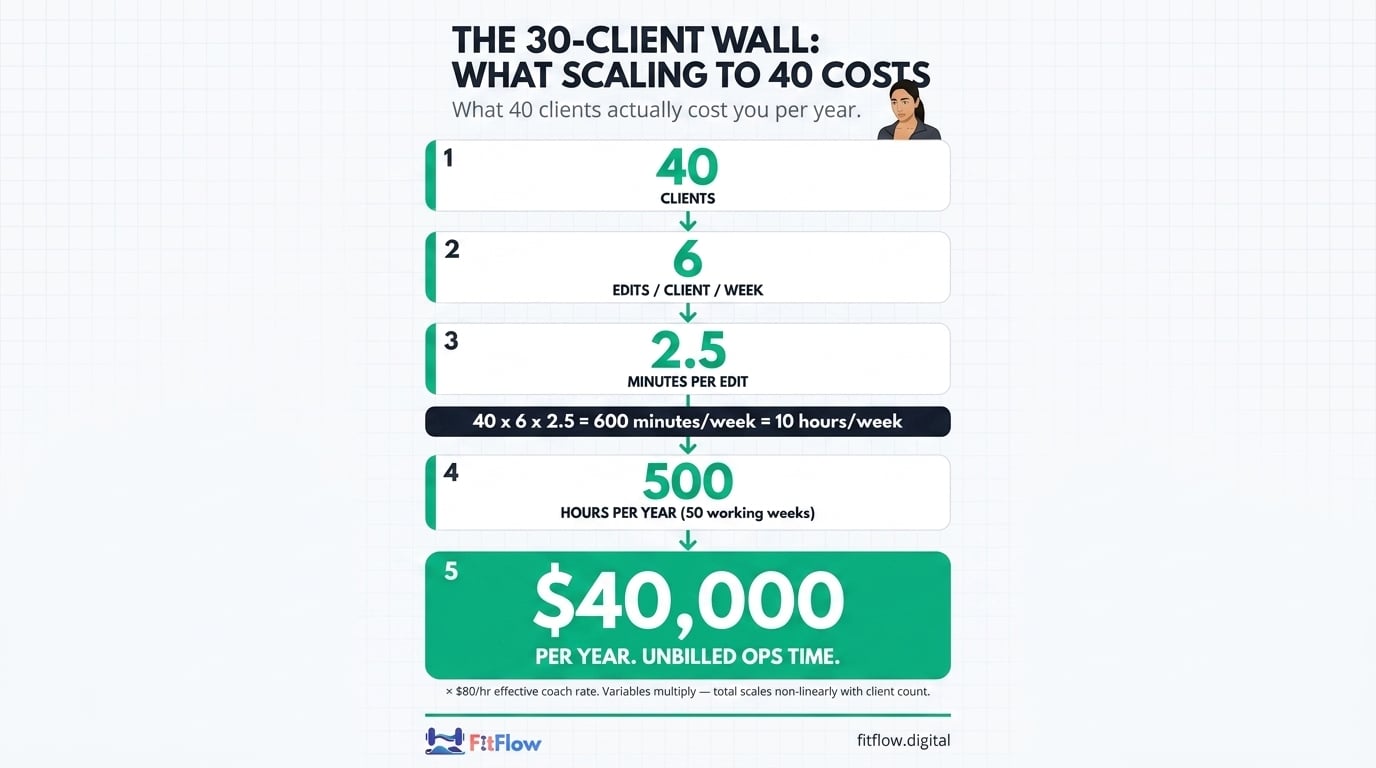
This is not abstract. Solo coaching businesses spend roughly 31% of working hours on non-billable administrative tasks (EntrepreneursHQ 2026). The Trainerize 2026 AI report frames it the same way: "Check-Ins AI summarizes 30 client check-ins every Monday, saving up to 80% of admin time" — confirming that 30 clients is the industry's reference unit for admin burden, and that 80% of that burden is mechanical.
How much time does each online coaching client take per week? At 20 clients, 60–90 minutes total per client (programming, check-ins, async). At 40 clients on a static stack, available time per client compresses to 25–45 minutes — and program-edit admin alone consumes 15 of those minutes before any actual coaching happens.
If you are Sam at 40 clients, 6 edits per client per week, 2.5 minutes per edit, $80/hr coaching rate, you are losing $40,000 of unbilled ops time a year. Before you scale headcount, compute your margin per available hour first. The hourly model — even repackaged as monthly retainers — hits a ceiling fast when delivery is not redesigned (Trainerize 2026 Revenue Strategy).
Why Spreadsheets and Docs Scale Linearly When Your Business Needs to Scale Exponentially
A Google Drive program doc is a static snapshot at the moment of creation. Every client's doc is independent. Editing one does nothing to the others. That is the architecture problem.
At 5 clients, the architecture is fine: 5 × 6 × 2.5 = 75 minutes/week. At 30 clients, it is structural: 30 × 6 × 2.5 = 7.5 hours/week — already past the burnout threshold. The cost is not the per-edit time. The cost is the linear-scaling architecture.
Master template fitness programming inverts the math. Instead of 40 independent docs, you maintain one master template, and each client gets a bound instance that inherits from it. Edit the master once, every instance updates — except where a client-specific override has been flagged.
Two-Brain Business has documented the same pattern in gym ownership: solo operators hit a structural ceiling because their delivery scales linearly while demand for attention scales non-linearly. The prescription is identical for online coaches — operationalize the template, not the instance. This is the philosophy behind treating operations as the constraint, not the program. Static docs cost you 10 hours a week at 40 clients (floor: 7.5 hr, ceiling: 15 hr). Live cascade templates cost you under 30 minutes a week at the same load. The difference is not effort — it is architecture.
What "Cascade Edit" Actually Means
Cascade edit fitness program work has three precise definitions:
Master template — the single source-of-truth program document. Owned by you. One file.
Instance — a client's bound copy of the master template. Inherits everything by default. Can carry per-client overrides.
Cascade edit — a change made to the master template that propagates automatically to every bound instance, except where an override flag protects client-specific work.
Personal trainer software for scaling either supports cascade edit fitness program logic or it does not. There is no middle ground. Static-copy templates (the legacy mode in most platforms) require you to open every client doc and apply the change manually. Cascade templates with override logic propagate the master change in seconds.
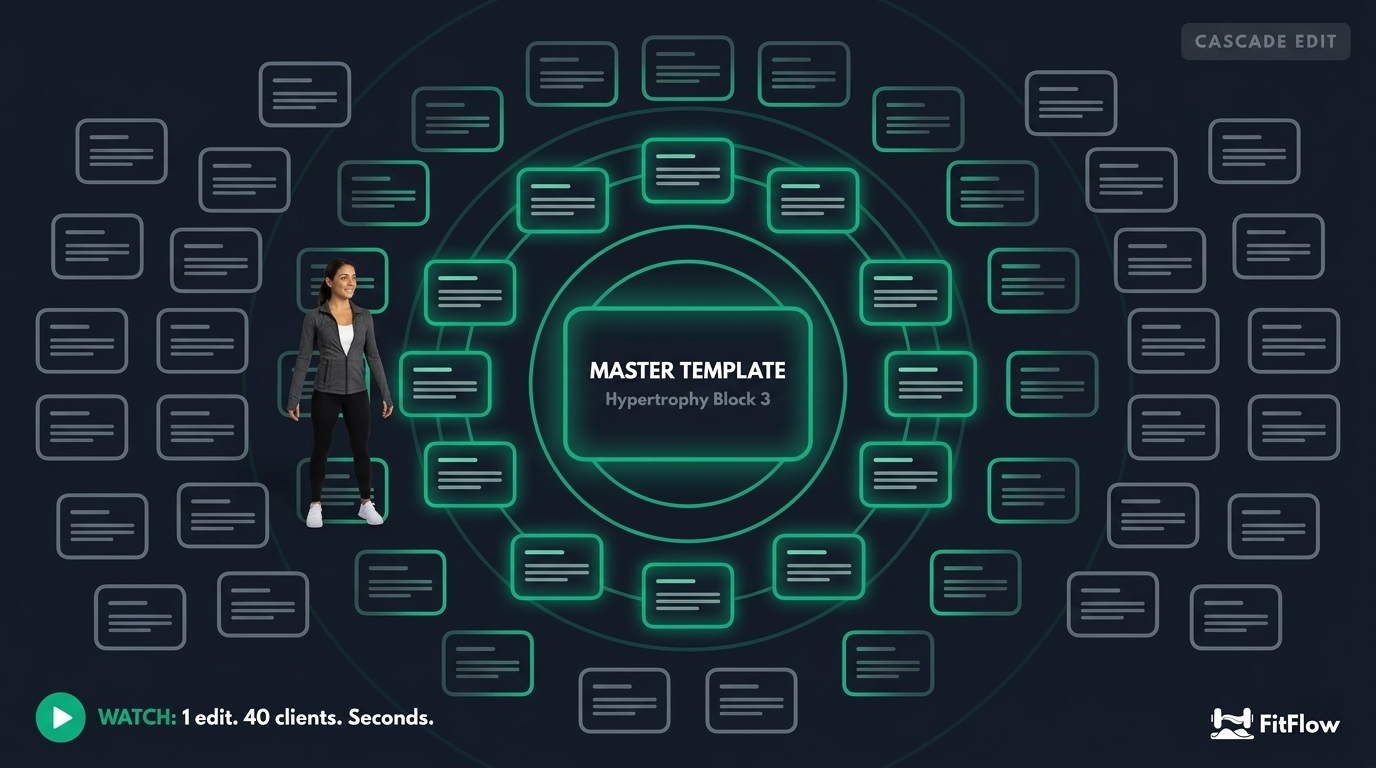
The concrete example: you edit the master "Hypertrophy Block 3" deload-week protocol. On a static stack, you open 40 client docs and edit each one — 40 × 2.5 minutes = 100 minutes for one decision. On a cascade stack, the master change propagates instantly; only flagged overrides land in a review queue.
Trainerize and TrueCoach both ship some form of template propagation in their 2026 releases. Configurations vary — check whether their propagation includes flagged conflict review before you commit. That review gate is what determines whether the architecture actually scales, and it is how FitFlow's cascade propagation works by default rather than as an add-on. Personal trainer software for scaling is binary: cascade-capable with conflict flagging, or not.
If Sam's Trainerize uses static-copy templates, Sam stays at 30 clients (the structural ceiling). If Sam's Trainerize uses cascade templates with override flags, Sam moves to 40-plus without adding ops hours. The mechanism — the master template fitness construct combined with cascade edit propagation — is what flips the math.
⏱ Stop guessing where the hours go. Run the Time-Audit Calculator.
Plug in your client count, edit frequency, and per-edit time. The calculator returns your weekly unbilled ops hours, your annual unbilled ops dollars, and your position on the 30-client wall (BELOW WALL / AT WALL / PAST WALL) in 30 seconds.
The Hard Part: Conflicts
Cascade edit without conflict logic is malpractice. Cascade edit with conflict logic is the operations win. The make-or-break distinction is silent overwrite versus flagged review.
Silent overwrite: the master-template change overwrites a client-specific customization without warning. The trainer never sees the diff. The client gets a programming change that contradicts their medical or contextual situation. Trust is the casualty.
Flagged review: the master-template change is held in a review queue when it would touch a client-specific override. The trainer sees a notification, opens the diff, and chooses keep / merge / reject. Cascade edit fitness program work is only safe with this gate in place.
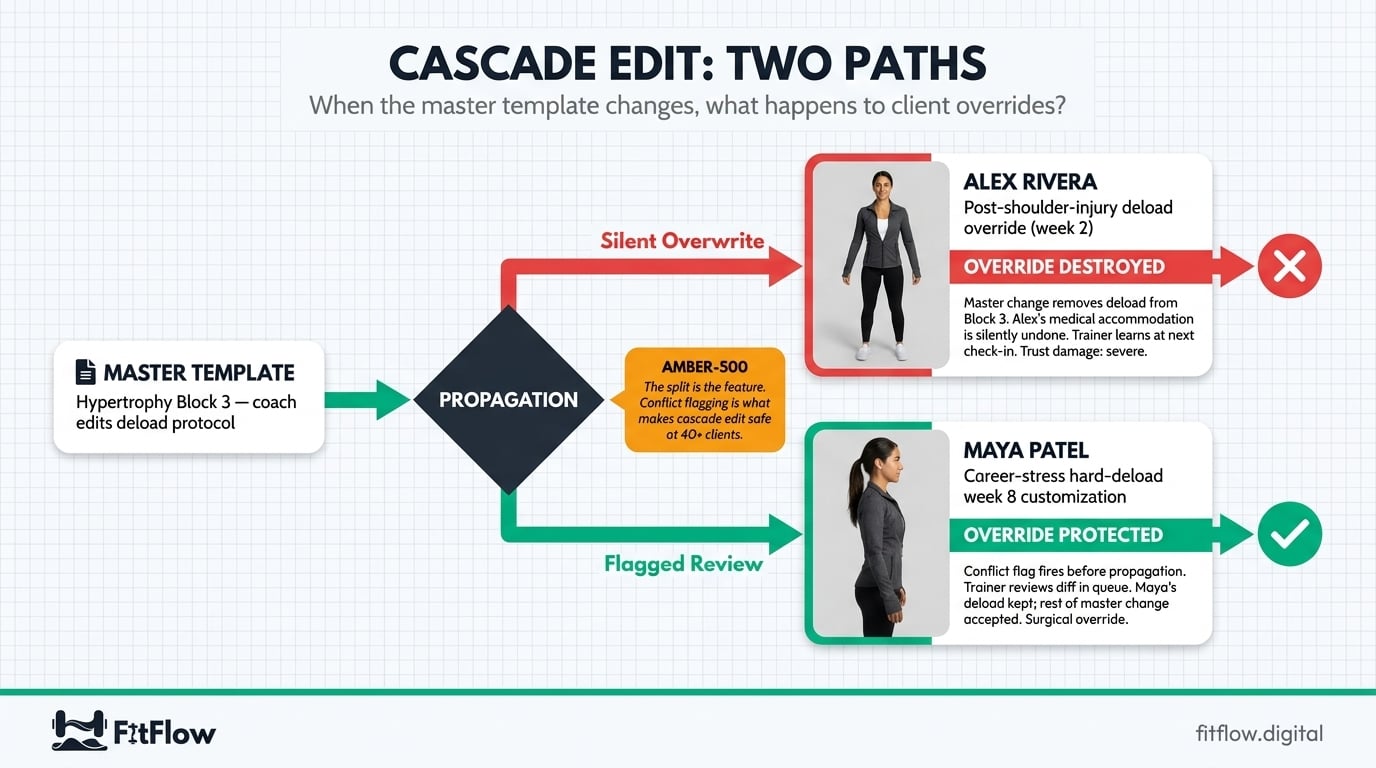
Two scenarios that show why this matters:
Alex Rivera — post-injury deload override. Alex tweaked a shoulder six weeks ago. You added a 2-week deload protocol specifically for Alex. Two weeks later, you update the master "Hypertrophy Block 3" template to remove the standard deload because most clients are progressing through it. On a silent-overwrite system, the master change wipes Alex's deload and Alex returns to heavy pressing — catastrophic for a recovering shoulder. On a flagged-review system, the change hits the queue, you see "Alex Rivera: deload override conflict," you open the diff, you keep Alex's override, you accept the rest. Two minutes (floor: 1 min, ceiling: 5 min). No clinical risk.
Maya Patel — protected deload week. Maya is a senior litigator entering a trial cycle. You manually scheduled a hard-deload week 8 to align with her career stress. Two months later, you push a master programming change that would shift week 8's load up. Conflict flag fires. You see "Maya Patel: scheduled deload conflict." Decision: maintain Maya's deload, accept the rest. Master template fitness logic protects the customization while the rest of the change propagates.
These are not edge cases. Practitioner research from PT Distinction and Two-Brain Business consistently identifies conflict-handling as the chokepoint that determines whether software actually scales delivery. Two decisions. Two minutes. No clinical risk. That is the conflict-flagging payoff. The deeper conflict-flagging UX — when silent overwrite is acceptable, when it should be blocked, and how to design the queue — is a future cluster post.
What Changes for You
How to Manage Online Coaching Clients After the Wall: The New Weekly Cadence
How to manage online coaching clients past the 30-client wall comes down to a single architectural decision — and a redesigned weekly cadence. The decision is to move from a static-document stack to a cascade-capable personal trainer software for scaling. The cadence redesign is what makes the architecture deliver.
Here is the before/after for your online coach workflow. Note: the "Before" and "After" columns reflect different client loads — the architecture change is what makes the higher load possible without adding hours.
Activity | Before (static stack, 30 clients) | After (cascade stack, 40 clients) |
|---|---|---|
Program edits | 6/client × 30 × 2.5 min = 7.5 hr/wk | 1 master edit (5 min) + ~4 flagged reviews (2 min each) = 13 min/wk |
Async check-ins | ~3 min × 30 = 1.5 hr/wk | ~3 min × 40 = 2 hr/wk (linear; not the chokepoint) |
Stack-context switching | 4–6 platforms, ~45 min/day | 1–2 platforms (consolidated), ~15 min/day |
Total weekly ops time | 12–14 hr/wk | 4–5 hr/wk |
Client count supported | 30 (wall) | 40+ (wall broken) |
The savings are not from working faster. They come from removing the linear-scaling component entirely. Program edits stop scaling with client count once you scale online coaching business operations around master template fitness logic.
The other half of the playbook is stack consolidation. The "Frankenstein stack" (Trainerize + Google Drive + Calendly + Stripe + ConvertKit + Slack) has been quietly consolidating into single-vendor platforms across 2025–2026. TrueCoach's 2026 industry report flags admin overload as the top trainer challenge, and the platforms have responded with all-in-one launches. Pair the operations redesign with the right automation taxonomy for the 80% of admin work that should never reach you. For implementation specifics — including cascade-template-supported plans and pricing — start with the audit, not the tooling.
The Honest Limitations
Cascade edit fixes program-edit linear scaling. It does not fix the rest of the work.
It does not fix client communication frequency. Async messages still scale linearly — 3 minutes × 40 clients = 2 hours per week. That is the work. Do not automate it.
It does not fix accountability calls. The 15-minute weekly check-in with a struggling client is the trust-building part of the job. It is the reason your retention is what it is. Cascade edit is invisible to the client; accountability calls are visible. Keep them.
It does not fix trust. Trust is built per-relationship over months. No cascade-template architecture replaces the human contact.
If you are burning out from too many accountability calls — not too many program edits — this post does not solve your problem. The 32.8% burnout rate (ISSA 2025) has more than one cause. This playbook addresses the program-edit linear-scaling cost specifically. The relationship side of how to manage online coaching clients at scale requires retention systems, group programming, and pricing redesign — different prescriptions for different roots of online personal trainer burnout.
Run Your Math
The 30-client wall is not a skill problem. It is an architecture problem with specific math. Run yours.
Step one — Calculator. Run the Time-Audit Calculator. Plug in your client count, edits per week, time per edit, and effective hourly rate. The output is your annual unbillable ops dollars and your position on the wall.
Step two — Waitlist. If your calculator number is above $20K/year of unbilled ops time (floor: $20K, ceiling: $60K), you are the persona for FitFlow's cascade-template feature, currently in private waitlist. Calculator first. Waitlist second.
You already counted the program docs. Now run the math on what they cost you. Then decide whether the wall is where you live, or where you leave.